Paperpal is an AI writing assistant built for one kind of writing: academic. It comes from Cactus Communications, the company behind the Editage editing service, and it's trained to edit research papers, theses and essays without flattening the technical language your field depends on. It works inside Word, Google Docs, Overleaf and your browser. The question most students and researchers have is whether it's really better than a general grammar checker, and which plan to pay for now that there's a new Pro tier. This review covers what Paperpal does well, what it doesn't do, the 2026 pricing, and how to use it without running into trouble with your university or journal.
Run a methods section through a regular grammar checker and you'll see the problem straight away. It flags your terminology as spelling mistakes, suggests making a carefully hedged sentence "more confident", and tries to turn passive voice into something that reads like a blog post. For academic writing, that advice is often wrong.
Paperpal is built to avoid that. It's trained on published research, so it understands that "the samples were incubated" is normal in a methods section and that "may suggest" is deliberate, not weak. It fixes the language without rewriting the science.
It's especially useful if English isn't your first language. A large share of researchers write in English as a second or third language, and the difference between an accepted paper and a desk rejection is sometimes just how clearly it reads. Paperpal is designed for exactly that gap.
What Paperpal is
Paperpal is an AI-powered academic writing assistant that edits, rewrites, checks and helps you research academic documents. It's made by Cactus Communications, which has run the Editage manuscript editing service for researchers for many years. That background shows in what Paperpal focuses on.
It does three jobs. First, it's a language editor that corrects grammar, clarity, word choice and consistency in academic style. Second, it's a writing assistant with AI tools to rewrite, paraphrase, shorten, translate and draft. Third, it's a research helper that finds references, generates citations, lets you chat with PDFs and checks whether a manuscript is ready to submit.
The important point is where it works. You don't have to copy text into a separate website. Paperpal runs as an add-in for Microsoft Word, inside Google Docs and Overleaf, and through a browser extension, so the suggestions appear in the document you're already writing.
A general grammar checker makes your writing sound friendlier. Paperpal makes it sound like it belongs in a journal.
The features that matter most
Academic language editing
Grammar, clarity, vocabulary and tone suggestions tuned for scholarly writing, with consistency checks for terms, spelling style and references.
AI Copilot
Rewrite, paraphrase, trim, expand or translate selected text, plus templates for outlines, abstracts and other common academic sections.
Reference finder and citations
Search a database of 250M+ research articles for sources, then generate citations in more than 10,000 styles.
Chat with PDFs
Upload a paper and ask questions about it, which speeds up literature reviews when you're working through dozens of articles.
Plagiarism checks
Check your draft for overlap with existing work before you submit, with a monthly word allowance that depends on your plan.
Submission readiness checks
Preflight runs 30+ checks for common technical and language issues journals look for, so fewer avoidable problems reach the editor.
Paperpal helps most when your notes and sources are already in order. Many students keep a running research log of what each paper said and where they might cite it. RytePad's list of the best online notepads covers simple free options, and its roundup of the best online diary apps works well if you prefer a dated research journal.
What a Paperpal-style edit looks like
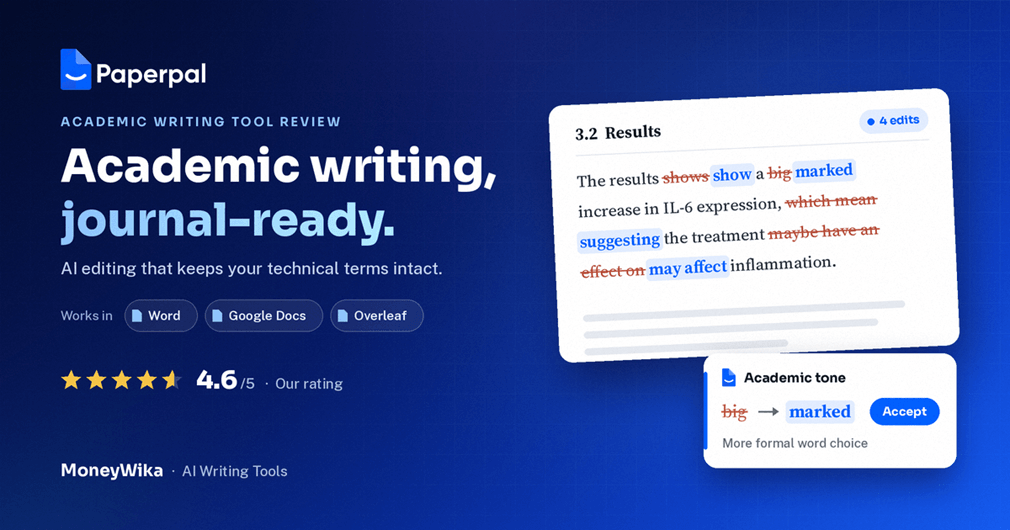
Here's the kind of change Paperpal is designed to make. The meaning and the technical terms stay the same. The sentence becomes clearer and more formal.
Notice what didn't happen. "IL-6" wasn't flagged, the hedging ("may affect") was kept because the claim is tentative, and the sentence wasn't made casual. That restraint is the main reason researchers pick Paperpal over general tools.
Paperpal pricing in 2026
Paperpal now has three tiers: Free, Prime and the newer Pro. Annual billing makes a big difference to the price.
- 200 language suggestions a month
- 5 AI actions a day
- 7,000 words of plagiarism checks a month
- Unlimited citation generation
- Unlimited language and consistency checks
- Unrestricted AI features
- 10,000 words of plagiarism checks a month
- 30+ submission readiness checks
- Chat PDF on the Advanced model
- Everything in Prime
- Aimed at theses and journal manuscripts
- Built for high-stakes and clinical documents
- Upgrade from Prime mid-cycle
For most students and researchers, Prime on annual billing is the right choice. Paying monthly for a full year costs $300. The annual plan costs $144, which saves more than half. Paperpal has also offered longer multi-year options that lower the monthly cost further.
The free plan is genuinely usable for short assignments or for testing the editor. But 200 suggestions can run out in one intensive session on a full manuscript, so anyone writing a thesis or paper will hit the limit quickly.
Some reviews still list Prime at $139 a year and a $55 quarterly plan, without the Pro tier. Those figures are from earlier pricing. Recent 2026 sources show Prime at $144 a year and Pro at $59 a month or $348 a year. Paperpal also runs regional pricing and student discounts, so check the price shown for your country on the Paperpal website before you subscribe.
Paperpal vs Grammarly for academic writing
This is the comparison most people are actually making. Both are good tools. They're built for different writing.
| Paperpal | Grammarly | |
|---|---|---|
| Built for | Academic and research writing | General everyday and business writing |
| Technical terms | Preserves field-specific vocabulary | May flag specialist terms |
| Tone | Formal, scholarly | Often clearer and more conversational |
| Overleaf / LaTeX | Yes | Limited |
| Citations and references | Reference finder plus 10,000+ styles | Citation help in some features |
| Submission checks | 30+ journal-readiness checks | No journal-specific checks |
| Everyday writing | Not its focus | Excellent for emails, posts, documents |
The simple rule: if most of your writing is papers, theses or assignments, Paperpal is the better fit. If most of it is emails, reports and general content, a general tool will serve you better. Some people use both, Paperpal for research and a general tool for everything else.
Using Paperpal responsibly
This is the part most reviews skip, and it matters more than any feature. Universities and journals have rules about AI in academic work, and those rules differ.
Using AI to correct grammar and improve clarity is widely accepted, much like using a human proofreader. Using AI to generate ideas, arguments or whole sections is where policies get strict. Many journals require you to disclose AI use, and many universities treat undisclosed AI-generated text as misconduct.
1. Check your institution's or journal's AI policy first. Look for the author guidelines or academic integrity policy and see what's allowed and what must be disclosed.
2. Use editing freely, use generation carefully. Language polishing is the safe core of Paperpal. Treat AI-drafted text as a starting point you rewrite in your own words.
3. Verify every reference. Always open and read a source before citing it. A tool can help you find papers, but you're responsible for what you cite.
Used this way, Paperpal makes your own work clearer without replacing your thinking. That's also how it's most useful in practice.
How to get the most out of Paperpal
Install it where you write
Add the Word add-in, or connect Google Docs or Overleaf. Working inside your real document is faster and avoids formatting problems from copying and pasting.
Write your draft first, then edit
Get your ideas down without stopping to fix every sentence. Run Paperpal on a full section afterwards, when you can see the suggestions in context.
Review suggestions, don't accept all
Read each change. Most will be right, but you know your field better than any tool, so reject anything that changes your meaning.
Run the consistency check
Long documents drift between spellings, abbreviations and term formats. The consistency check catches this across the whole manuscript.
Check plagiarism and readiness before submitting
Run the plagiarism check and the submission readiness checks as a final step, so avoidable issues are fixed before an editor or supervisor sees them.
Theses and papers involve a lot of dates: chapter drafts, supervisor meetings, submission windows and revision deadlines. A simple planner with reminders stops the important ones slipping. We use RytePad for scheduling and reminders about what needs doing and when.
If your research turns into something you want to teach, such as a methods workshop or an online course, our Teachable review covers how academics and experts build and sell courses. And if you'd like to turn lectures or papers into audio, our ElevenLabs review explains how AI narration works.
Pros and cons
👍 What we like
- Built for academic writing, so it respects technical terms and hedging
- Works inside Word, Google Docs, Overleaf and the browser
- Very helpful for non-native English writers
- Reference finder, citations and PDF chat in one tool
- Submission readiness checks catch avoidable issues
- Usable free plan for testing and short work
- Prime is good value on annual billing, about $12 a month
👎 What to watch
- Free plan's 200 suggestions run out fast on long documents
- Monthly Prime is expensive compared with annual
- Not designed for everyday writing like emails and blog posts
- Doesn't replace expert review of your argument or journal fit
- AI generation needs care under university and journal policies
- Pricing has changed recently, so older reviews can mislead
- Some suggestions still need rejecting by someone who knows the field
Paperpal is a great fit if…
- You write papers, a thesis or academic assignments regularly
- English isn't your first language
- You write in Overleaf or LaTeX
- You want editing, citations and checks in one place
- You're preparing a manuscript for submission
Look elsewhere if…
- Most of your writing is emails, marketing or general content
- You need an expert to judge your argument or journal choice
- You only write one short essay a year
- Your institution bans AI writing tools entirely
Write clearer academic English, in the editor you already use
Start with Paperpal's free plan in Word, Google Docs or Overleaf. Upgrade to Prime when you're working on a full paper or thesis and need unlimited editing.
Free plan available · Prime from about $12/month billed yearly · works in Word, Docs, Overleaf and web
Frequently asked questions
Paperpal has a free plan with usage limits. Prime costs $25 a month or $144 a year, which works out to about $12 a month. The newer Pro tier costs $59 a month or $348 a year.
Some older reviews list Prime at $139 a year with a $55 quarterly option. Prices vary by region and student discounts, so check the price for your country before subscribing.
Yes, there's a free plan that never expires. It includes 200 language suggestions a month, 5 AI actions a day, plagiarism checks up to 7,000 words a month and unlimited citation generation.
It's fine for short assignments and testing, but a full paper or thesis chapter will usually need Prime.
For academic writing, Paperpal is usually the better fit. It's trained on scholarly writing, keeps technical terms, favours a formal tone, works in Overleaf and adds citation and submission-readiness tools.
For everyday writing like emails and blog posts, Grammarly is the stronger choice. Many people use Paperpal for research and a general tool for everything else.
It depends on your university or journal. Using AI to correct grammar and improve clarity is widely accepted, similar to a proofreader. Using AI to generate content is restricted by many institutions, and many journals require AI use to be disclosed.
Always check your institution's academic integrity policy or the journal's author guidelines first, and verify every reference yourself.
Yes. Paperpal works as a Microsoft Word add-in, inside Google Docs and Overleaf, through a browser extension and on its own web editor. Suggestions appear inside the document you're writing.
Paperpal is made by Cactus Communications, the company behind the Editage manuscript editing service for researchers. Its focus on academic language reflects that background.
The verdict
Paperpal does something general writing tools don't: it edits academic writing on its own terms. It keeps technical vocabulary, respects careful hedging and moves your prose towards a formal scholarly tone. For non-native English writers especially, that can make a real difference to how a paper is received.
The extras are useful rather than padding. Reference search, citation generation, PDF chat and submission readiness checks all sit in the same place as the editor, inside Word, Google Docs or Overleaf.
It isn't a replacement for a supervisor or expert reviewer, and AI generation needs care under university and journal rules. But as a daily editing tool for academic work, it's one of the best available, and Prime at about $12 a month on annual billing is easy to justify for anyone writing a thesis or papers.
Pricing and plan limits in this review reflect Paperpal's 2026 pricing as reported by multiple recent sources. Older sources list Prime at $139 per year and a $55 quarterly plan. Paperpal offers regional pricing, student discounts and occasional promotions, so confirm current prices on the Paperpal website for your country. The before-and-after example is an illustration of academic editing, not a captured Paperpal output. Guidance on AI use is general information, not academic or legal advice; always follow your institution's and journal's policies. This page contains affiliate links, which means we may earn a commission at no extra cost to you if you sign up through them. Our opinions are our own.