
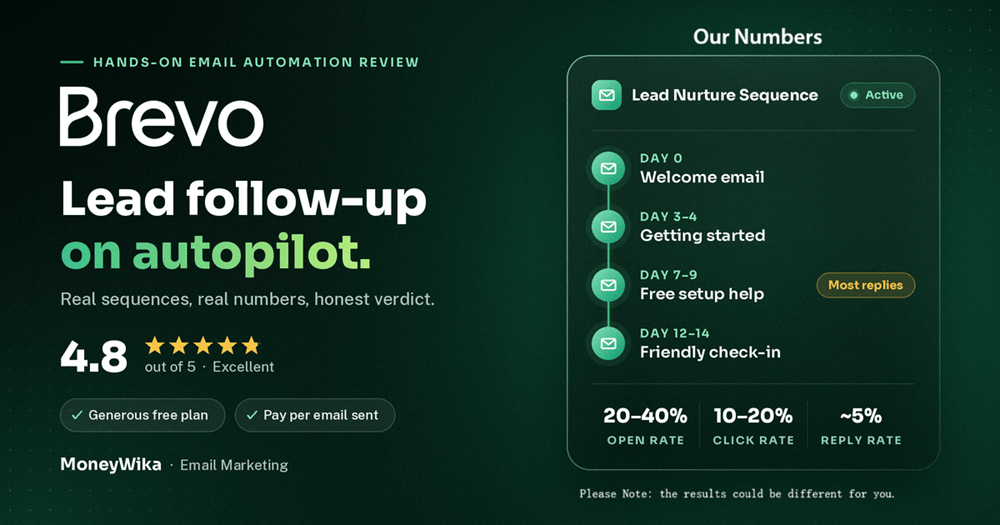
Brevo is the email platform we actually run our lead follow-up on. At MarkSurge, our parent company, we promote software brands like Apollo, Systeme.io, HighLevel and Deel, and every lead who signs up through us gets an automated email sequence from Brevo. Our sequences average 20 to 40% open rates. This isn't a feature-list review. It's how we've used Brevo for the past one to two years: how leads get from our servers into Brevo, what our 2-week sequences look like, the numbers we see, and the limits you should know about before you sign up.
Is Brevo worth it in 2026? Yes, if you need reliable automated email at a fair price. Brevo charges by the number of emails you send, not the number of contacts you store. That suits businesses with lots of small lists. Automation starts on the Standard plan at $18 a month. We use it to send 3 to 4 email sequences to new leads across several partner programs. Those sequences average a 20 to 40% open rate, a 10 to 20% click rate and about a 5% reply rate.
Most people who sign up for a software tool through an affiliate link never hear from anyone again. They get the vendor's generic onboarding emails, get stuck on step two, and quietly give up. That gap is where a lot of affiliate revenue disappears.
We noticed it early at MarkSurge. A lead who joined Systeme.io or HighLevel through us would sign up and then go quiet. That isn't because they lost interest. Setting up a new platform takes real effort, and nobody was helping. So we built follow-up around every program we promote, and Brevo is the platform that sends it.
We've used it for one to two years now. It isn't flashy. What it does well is take a lead from our system, put them in the right list, and send the right email at the right time without anyone touching it.
What Brevo is (and what it used to be called)
Brevo is an all-in-one email marketing and automation platform, formerly known as Sendinblue. It handles marketing campaigns, automated sequences, transactional emails, SMS, WhatsApp and a basic CRM, all from one account.
What sets it apart is how it charges. Most email tools bill by the number of contacts you store, so your bill grows as your list grows, even if half those people never open anything. Brevo bills by the number of emails you send each month. For us that matters a lot. We run separate lists for each partner program. Some have 100 people and some have more than 2,000. Paying per contact across all of them would add up quickly.
The free plan lets you store up to 100,000 contacts and send 300 emails a day. Marketing automation, which is what we use most, starts on the Standard plan. In 2026 Brevo renamed its old Business plan to Standard and kept the same $18 starting price.
How we automate every lead, step by step
This is the actual setup behind our partner programs. It isn't complicated, and that's partly why it has kept running reliably.
A lead signs up through one of our partner links
Someone joins Apollo, Systeme.io, HighLevel, Deel or another brand we promote. That signup can come from our content, ads, social posts or an earlier email.
The partner sends us the lead details via postback
The partner platform notifies our server that a signup happened and which program it belongs to. That data lands in our own database first, so we always own the record.
Our script pushes the contact into Brevo
We wrote a small script that sends each new lead from our database to Brevo through its API and adds them to the contact list for that program. No Zapier and no manual CSV uploads. The API is simple, and this is one of the main reasons we chose Brevo.
Joining the list triggers that program's automation
Each program has its own automation in Brevo. When a contact is added to the list, the sequence starts. A HighLevel lead gets HighLevel emails and an Apollo lead gets Apollo emails.
New leads always get the same tested sequence
Anyone who joins later goes through the same sequence for that program. Once we've improved a sequence, every future lead gets the improved version automatically.
We set up each program's sequence once, test it, and then every new lead gets the same quality of follow-up without us lifting a finger.
You don't need custom code for this. Brevo has ready-made integrations and forms, and tools like Make can move leads from almost any app into a Brevo list. Our Make.com review shows how that kind of no-code workflow is built. Landing page builders like the one in our Leadpages review can also send signups straight into Brevo.
What our 2-week sequences look like
Each program gets 3 to 4 emails spread over about two weeks. The goal isn't to sell harder. It's to help the lead actually get started with the platform they just joined, because people who get set up are the ones who stick around.
Welcome
Sent right after signup. Confirms what they joined and gives the one first step that matters most.
Getting started
A practical walkthrough of the feature most new users get stuck on in that specific platform.
Free setup help
We offer personal, free help setting up their account. This is where most of our replies come from.
Check-in
A short, friendly nudge for anyone who hasn't finished setup yet, with an easy way to reply.
The free setup offer is the email that works hardest. When someone has just signed up for a platform like HighLevel and doesn't know where to begin, a real person offering to help is far more useful than another tutorial link. The roughly 5% of leads who reply to our sequences mostly reply to that email, and those conversations are where the relationship actually starts.
One thing we learned: the shorter and more personal the email reads, the better it performs. Our best emails look like a note from a person, not a newsletter. Brevo's simple editor makes that easy, since you aren't pushed into heavy templates.
With several partner programs running at once, it's easy to lose track of what needs doing and when. We use RytePad as our planner. Every new program's sequence gets drafted there first, and we set schedules and reminders for the jobs around it: when to review a sequence's numbers, when to refresh an email that's slipping, and when a broadcast to older leads is due.
Brevo handles the sending. RytePad tells us what to work on next. Fixing a flow on paper is much faster than fixing it inside the automation builder, and the reminders mean nothing gets forgotten once a program is live.
The results we see
Here's what our automated sequences deliver on average across programs:
| Metric | Our automated sequences | What it tells us |
|---|---|---|
| Open rate | 20–40% | Leads expect these emails because they just signed up |
| Click rate | 10–20% | The setup content is genuinely useful to them |
| Reply rate | ~5% | The free setup offer starts real conversations |
| List size | 100 to 2,000+ per program | Volume-based pricing keeps small lists affordable |
Industry averages for email sit around 20 to 25% opens and 2 to 3% clicks, so our click rates in particular show the setup content is landing. Below is a screenshot from our own Brevo dashboard showing three recent broadcast campaigns sent to whole program lists, including older contacts and cancelled accounts:
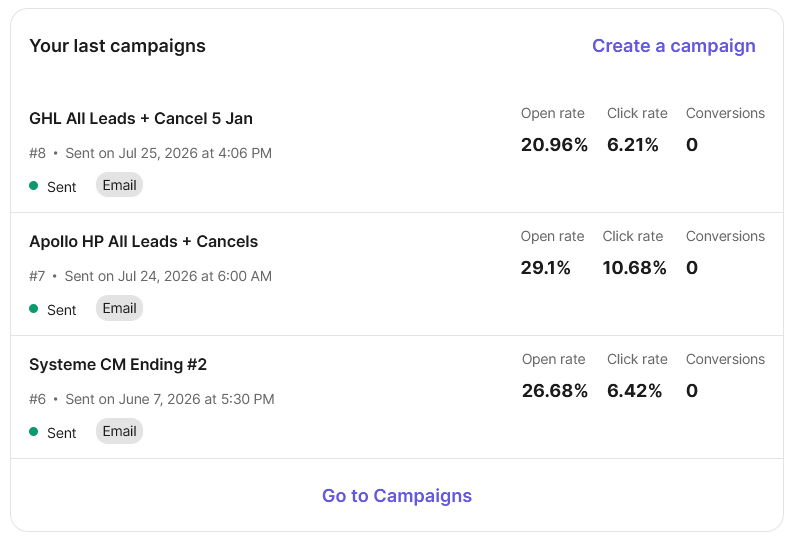
Our real Brevo dashboard: broadcasts to full HighLevel, Apollo and Systeme.io lists, with 21–29% opens and 6–11% clicks.
Broadcasts like these land 21 to 29% open rates and 6 to 11% click rates, which is solid for re-engagement mail to people who signed up weeks or months earlier. Automated sequences sit at the top of our range because they reach people at the moment they care most, right after signup.
Brevo's conversion column only counts conversions that Brevo tracks itself. Ours happen on partner platforms and come back to us through postbacks, so they never show up inside Brevo. If you're an affiliate, don't judge your email results by that column. Track conversions where your partner reports them.
The features that matter most to us
A clean, simple API
Our own script adds contacts to the right list with a single API call. It has been one of the most reliable parts of our whole lead pipeline.
Strong deliverability
Our emails reach inboxes, which shows in our open rates. Independent tests generally put Brevo in the low-to-mid 90s percent for inbox placement.
An automation builder that's easy to use
Building a trigger, delays and emails takes minutes. We can set up a full sequence for a new partner program in one sitting.
Lists and segments per program
Each program has its own list, so messaging stays specific. Segments help us target things like cancelled accounts with a different message.
Transactional email included
The same account can send system emails such as confirmations and receipts through SMTP or the API, separate from marketing mail.
SMS and WhatsApp when needed
SMS is available from Starter on pay-as-you-go credits. WhatsApp campaigns need the Professional plan. We mostly stick to email.
One important distinction: Brevo is for sending email to lists. It isn't your day-to-day mailbox. We keep conversations with leads who reply in a normal business inbox, which is the kind of tool covered in our Fastmail review. Keeping the two jobs separate also protects the sending reputation of your main domain.
Brevo pricing in 2026
Brevo has a free plan and four paid plans. Prices below are monthly starting prices in USD at the lowest email volume. They rise as you send more. Paying yearly saves about 10%.
- Email campaigns
- Basic CRM
- Brevo logo on emails
- No daily sending limit
- Segmentation and forms
- No marketing automation
- Marketing automation
- A/B testing
- Send time optimisation
- No Brevo logo
- WhatsApp, push, popups
- 10 user seats
- Contact scoring
Enterprise sits above Professional with custom pricing. For most small businesses and affiliates, Standard is the plan that makes sense, because it's the first one with automation. Starter looks cheaper but doesn't include automated sequences, which is the main reason to use Brevo in the first place.
Removing the Brevo logo on Starter is a paid add-on, and Starter plus that add-on can end up costing about the same as Standard. Extra users and some advanced options are add-ons too. The jump from Standard ($18) to Professional ($499) is large, but Professional starts at 150,000 emails a month, so the cost per email is roughly the same. SMS is charged separately in credits. Prices change, so check Brevo's pricing page in your currency before you buy.
Brevo vs ActiveCampaign: which one?
We're familiar with both, and they suit different jobs. ActiveCampaign is the deeper automation platform. Its AI layer, now on Active Intelligence 3.0: Wavelength, can draft campaigns and monitor your automations for you, which we covered in our Wavelength guide. Brevo is simpler, and its send-based pricing is kinder to many small lists.
| Brevo | ActiveCampaign | |
|---|---|---|
| How you're billed | Emails sent per month | Contacts stored |
| Automation from | Standard, $18/mo | Starter plan and up |
| Automation depth | Simple, fast to build | Very deep, with branching and scoring |
| AI features | AI content help, send time | Active Intelligence 3.0: Wavelength |
| Best for | Many small lists, simple sequences | Complex journeys, CRM-led sales |
Our honest take: if you're running straightforward sequences across lots of programs or small lists, Brevo is the more economical choice. If you need complex branching, deep lead scoring or an AI that actively manages your automations, ActiveCampaign is worth the higher price. Our full ActiveCampaign review covers it in depth, and our ActiveCampaign vs Mailchimp comparison helps if you're weighing other options too.
Pros, cons and honest limits
👍 What we like
- Pricing based on emails sent, great for many small lists
- Simple API that works smoothly with our own script
- Reliable deliverability, reflected in our 20 to 40% open rates
- Automation builder that's quick to learn and use
- Generous free plan with up to 100,000 contacts
- Marketing and transactional email in one account
- SMS and WhatsApp available when you need them
👎 What to watch
- No marketing automation on the Starter plan
- Brevo logo on Free and Starter unless you pay to remove it
- Big price jump from Standard to Professional
- Automation is simpler than ActiveCampaign's for complex journeys
- Conversion tracking doesn't see sales that happen on partner sites
- Lower-tier support can be slower than on higher plans
- WhatsApp campaigns only on Professional
None of these have been deal-breakers for us. The Starter limitation is the one that catches most new users, so if automation is why you're signing up, go straight to Standard.
Follow up with every lead automatically
Brevo is what we use to send every MarkSurge lead a sequence that helps them get started. Start on the free plan, then move to Standard when you're ready to automate.
Free plan with up to 100,000 contacts · automation from $18/month · pay for emails sent, not contacts
Frequently asked questions
Brevo has a free plan with 300 emails a day and up to 100,000 contacts. Paid plans start at $9 a month for Starter, $18 for Standard and $499 for Professional, each at its lowest email volume. Enterprise is custom priced.
Prices rise as your monthly sending volume increases, and paying yearly saves about 10%. Standard is the first plan with marketing automation.
Yes. Sendinblue rebranded as Brevo in 2023. Existing accounts, lists and integrations carried over.
In 2026 Brevo also renamed its old Business plan to Standard, at the same $18 starting price, so older guides may still mention Business.
The free plan is great for testing and sending simple campaigns, but full marketing automation is a Standard plan feature. Starter doesn't include it either.
If automated sequences are the reason you're choosing Brevo, start on the free plan to get familiar with it, then upgrade straight to Standard.
At MarkSurge, partner platforms send signup details to our server through a postback. A small script then pushes each lead into the matching Brevo list through the API, and joining the list triggers that program's email sequence.
You don't need custom code to do this. Brevo forms, native integrations and no-code tools like Make or Zapier can all add contacts to a list and start an automation.
Yes, especially if you promote several programs. Because Brevo bills by emails sent rather than contacts stored, keeping a separate list for each program stays affordable even as the lists grow.
Keep two things in mind. Always follow each partner's rules on email promotion, and track sales in your partner dashboards, because Brevo's conversion column won't see sales that happen on partner sites.
It depends on what you need. Brevo is more economical and simpler for straightforward sequences across many small lists.
ActiveCampaign is stronger for complex automation, CRM-led sales and AI-driven marketing through Active Intelligence 3.0: Wavelength. Many businesses start on Brevo and move to ActiveCampaign once their journeys get more complex.
Our verdict
After one to two years of running every MarkSurge partner program's follow-up on Brevo, it has earned its place. Leads move from our servers into the right list through a simple API call, sequences fire on time, emails reach the inbox, and the numbers back it up: 20 to 40% opens, 10 to 20% clicks and about 5% of leads replying.
The pricing model is what makes it work for a business like ours. Paying for emails sent, not contacts stored, means we can keep a separate list for every program without the bill getting out of hand.
It isn't the deepest automation platform available. If you need complex branching or AI that manages your campaigns, ActiveCampaign goes further. But for clear, helpful sequences that turn new signups into active users, Brevo does the job better than anything else we've tried at this price. 4.8 out of 5, and it's staying in our stack.