
MoneyWika earns a commission if you buy through some links on this page, at no extra cost to you. How we make money
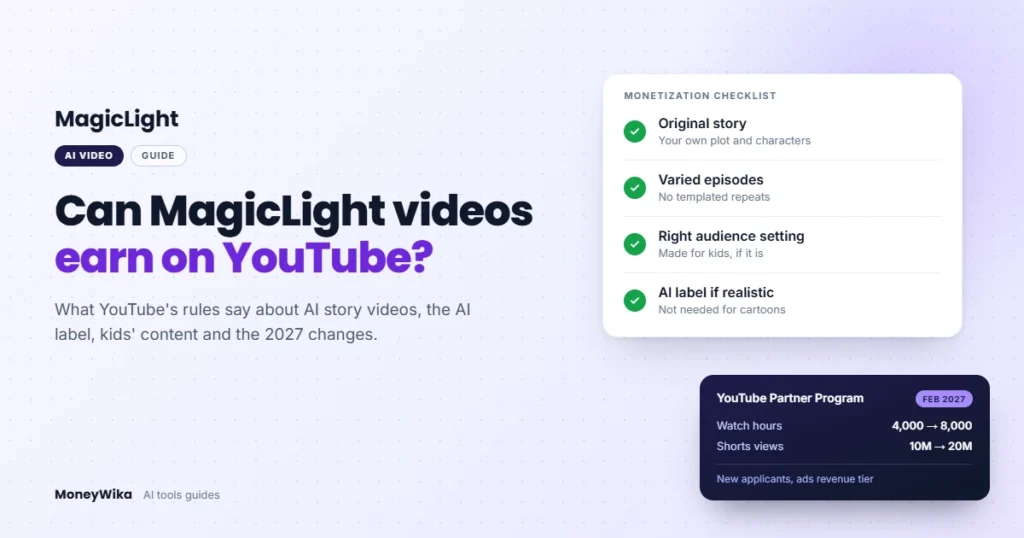
Yes, MagicLight videos can earn money on YouTube, but YouTube judges your channel, not the tool. Each video needs its own story and real narrative value, or it can fall under YouTube's inauthentic content rules.
MagicLight's paid plans include a commercial license and 1080p video with no watermark. From February 1, 2027, new applicants will need double today's watch hours or Shorts views to earn ad revenue.
This guide covers MagicLight YouTube monetization rule by rule: what YouTube allows, what it labels, and the settings that change your earnings. For the tool itself, see our MagicLight AI review.
MagicLight YouTube monetization at a glance
- Can it earn?
- Yes, if your channel meets YouTube Partner Program rules. YouTube reviews the whole channel, not the tool you used.
- Biggest risk
- The inauthentic content policy, which covers templated, repetitive and mass-produced videos
- Commercial rights
- Included with paid MagicLight plans, along with 1080p export and no watermark
- MagicLight price
- From $7.50 a month billed yearly ($90), or $15 month to month
- AI label
- Not needed for clearly unrealistic animation; needed when a scene looks real
- Ad revenue bar today
- 1,000 subscribers plus 4,000 watch hours in 12 months, or 10 million Shorts views in 90 days
- From Feb 1, 2027
- New applicants need 8,000 watch hours in 365 days, or 20 million Shorts views in 90 days
- Kids’ content
- Mark it as made for kids if it is; those videos lose personalized ads and comments
How we wrote this guide: on October 31, 2026, we read YouTube's help pages on monetization, the Partner Program, AI labels and kids' content. We also read YouTube's August 10, 2026 Partner Program announcement and MagicLight's pricing page, FAQ and terms. This guide reports what those published rules say, not results from any one channel (see how we review software).
On this page: Short answer · Inauthentic content · Reused content · AI label · Made for kids · Style presets · MagicLight plans · 2027 changes · Checklist · Bottom line · FAQ
The short answer: YouTube monetizes channels, not tools
YouTube doesn't ban AI tools from its Partner Program. Its AI disclosure page says labeling AI content won't, on its own, limit a video's audience or its eligibility to earn money (source).
What YouTube checks is the channel as a whole. Meeting the subscriber and watch-time thresholds doesn't guarantee approval, because YouTube reviews the whole channel against its policies (source).
MagicLight's FAQ says its videos won't be suppressed by YouTube, TikTok or Instagram, as long as they're original and follow platform rules (source). That condition is the part that matters, and it's YouTube, not MagicLight, that decides whether you meet it.
MagicLight YouTube monetization and the inauthentic content rule
On July 15, 2025, YouTube renamed its "repetitious content" policy to "inauthentic content" (source). YouTube called it a minor update, made to clarify that the policy covers repetitive or mass-produced videos.
This is the policy most likely to affect an AI story channel. YouTube gives these examples of videos that can't earn money:
- Similar or repetitive videos with little educational value, commentary or narrative, or little variation from one video to the next.
- Videos where characters are put in the same situation again and again, with the same outcome.
- Image slideshows, templated storylines or scrolling text with little or no narrative or commentary.
- AI-generated content made with generic or unoriginal templates that gives the impression of mass production.
YouTube also lists what's fine. A series that follows the same characters across episodes can earn. So can videos that share an intro and outro, as long as the rest is different.
The key line for MagicLight users is about creative vision. If you use automated tools or templates, YouTube says the final video must still show your creative vision. One example it accepts is using AI to visualize a character and story you invented.
Reused content: don't narrate other people's stories
YouTube's separate reused content policy covers videos built mainly from material you didn't create (source). Among its examples of content that can't earn are videos that only feature readings of material you didn't originally create.
For a MagicLight channel, that puts word-for-word adaptations of someone else's story at risk. YouTube says the policy applies to your channel as a whole, even if you have the creator's permission.
Copyright is a separate question. A channel can break the reused content policy even when nobody files a copyright claim.
YouTube's AI label: when MagicLight videos need one
YouTube asks creators to disclose AI-generated or altered content that seems realistic (source). Its examples include:
- A real person shown saying or doing something they didn't.
- Altered footage of a real event or place.
- A realistic-looking scene that never happened.
You don't need to disclose content that's clearly unrealistic, such as fantasy or animation, or minor aesthetic edits. MagicLight's cartoon, picture-book and 3D cartoon styles are clearly animation, so they usually don't need the label.
MagicLight also offers a Realistic style. If a scene could pass as real footage, disclose it in YouTube Studio when you upload. YouTube says creators who repeatedly skip disclosure can face penalties, including suspension from the Partner Program.
Made for kids: the setting that changes your earnings
MagicLight's FAQ lists children's stories among the content it supports, and its style library includes a Kids Story style (source). If your videos are made for children, YouTube says it's your legal responsibility to mark them that way.
YouTube weighs several signals when deciding who a video is for (source). They include:
- The subject matter, such as education for preschoolers.
- Whether children are the intended or actual audience.
- Characters or toys that appeal to children, including animated characters and cartoon figures.
- Songs, stories or poems for children.
Getting the setting right matters for revenue. YouTube turns off personalized ads, comments, notifications, channel memberships, Super Chat and merchandise on made-for-kids videos (source).
Marking a kids' video as not made for kids isn't a workaround. YouTube warns that setting your audience wrong can bring consequences on YouTube and legal ones under COPPA, the US children's privacy law.
Copyright and MagicLight's Disney, Pixar and Ghibli presets
MagicLight's style menu includes presets named after Disney, Pixar and Zootopia, and its FAQ lists a Ghibli-inspired style. A look inspired by a studio is different from copying its characters, names or logos.
MagicLight's terms make this your responsibility. You must not use the service to infringe anyone's copyright, trademark or publicity rights, though you own the videos made from your inputs (source).
For a monetized channel, the safest approach is simple. Create original characters, keep studio and film names out of your titles, tags and thumbnails, and don't recreate scenes from existing films.
What MagicLight's plans include for YouTube creators
Every paid MagicLight plan lists a "General commercial license" and 1080p HD video with no watermark (source). MagicLight's FAQ says commercial usage rights are included with paid plans, and names social media monetization as one use.
The free trial gives limited credits for one or two videos, according to MagicLight's FAQ. Treat it as a test of the format, not a plan for a channel.
| Plan | Month to month | Billed yearly | Credits a month (monthly / yearly) | Video generation a month (monthly / yearly) |
|---|---|---|---|---|
| Standard | $15 | $7.50 a month ($90) | 6,300 / 8,000 | Up to 110 / 130 min |
| Plus | $28 | $14 a month ($168) | 15,300 / 27,000 | Up to 260 / 450 min |
| Pro | $44 | $22 a month ($264) | 33,300 / 47,000 | Up to 560 / 780 min |
| Ultra | $90 | $45 a month ($540) | 84,000 / 150,000 | Up to 1,400 / 2,500 min |
| Ultimate | $150 | $75 a month ($900) | 207,000 / 280,000 | Up to 3,450 / 4,670 min |
Source: MagicLight's pricing page, checked on October 31, 2026. MagicLight labels its yearly prices a limited-time 50% discount.
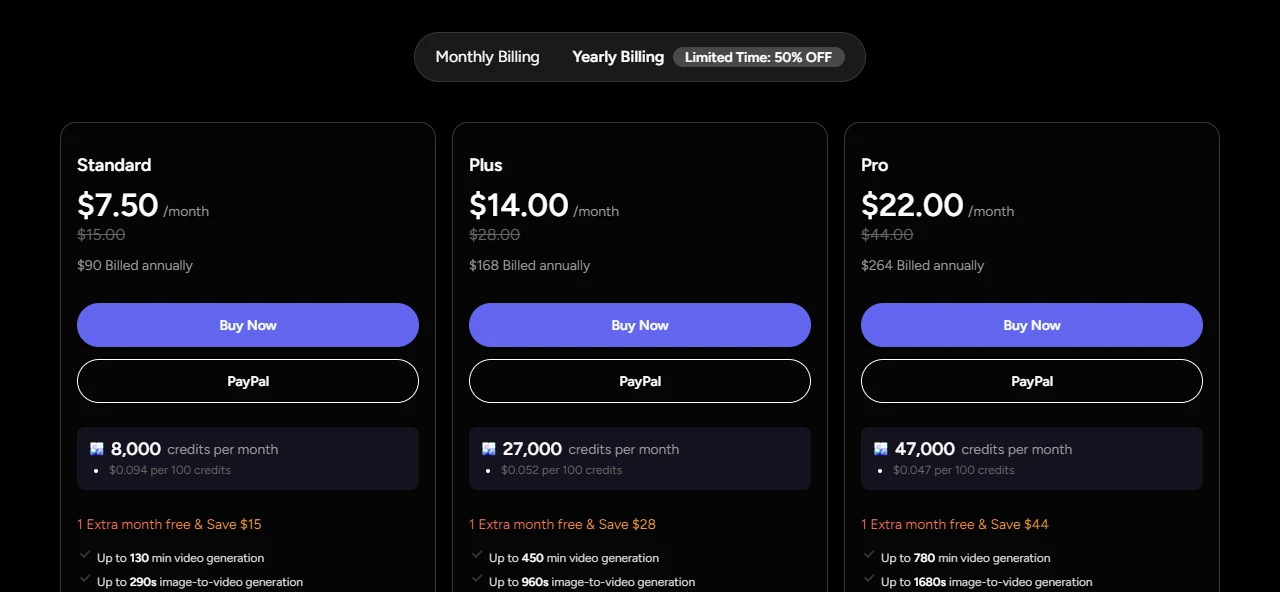
Credits can't be refunded once they're used, and MagicLight's terms say fees are non-refundable unless the terms state otherwise. Run the free trial before paying for a year.
MagicLight can also connect to your YouTube channel to sync and manage videos from its interface. Its terms say this needs permission to manage your YouTube account, which you can revoke in your Google account's security settings.
Test it before you commit. MagicLight's free trial needs no card and covers one or two videos.
Try MagicLight freeWhere MagicLight helps a channel
- Paid plans include a commercial license and no watermark.
- Every paid plan lists support for videos up to 50 minutes long.
- MagicLight says it keeps characters consistent across scenes, which suits a recurring series.
- The free trial needs no card, so you can test a format first.
Where it can hurt one
- It makes mass production easy, and mass production is what YouTube demonetizes.
- Presets named after Disney, Pixar and Zootopia invite copyright and trademark trouble.
- Kids' stories may need the made-for-kids setting, which turns off personalized ads.
- Credits can't be refunded once they're used.
YouTube Partner Program thresholds, now and from February 2027
On August 10, 2026, YouTube announced higher entry thresholds for sharing in ad and Premium revenue (source). They apply to new applicants from February 1, 2027, and channels already in the program keep their status.
| Tier | What you can earn | Entry bar today | From February 1, 2027 |
|---|---|---|---|
| Fan funding | Channel memberships, Super Chat, Super Thanks and Shopping | 500 subscribers, 3 public uploads in 90 days, and 3,000 watch hours in 12 months or 3 million Shorts views in 90 days | No change |
| Ad revenue | A share of ad and YouTube Premium revenue | 1,000 subscribers, plus 4,000 watch hours in 12 months or 10 million Shorts views in 90 days | New applicants need 8,000 watch hours in 365 days or 20 million Shorts views in 90 days |
Sources: YouTube's expanded YPP overview and its August 10, 2026 announcement, checked on October 31, 2026. YouTube counts qualified watch hours and qualified Shorts views.
Two more changes matter for current partners. From February 1, 2027, earning ad revenue from Shorts will require keeping 10 million qualified Shorts views over the past 90 days. Partners must also accept the updated YPP terms in YouTube Studio by January 31, 2027 to keep earning.
YouTube's other requirements apply to every channel (source):
- Live in a country or region where the Partner Program is available.
- Have no active Community Guidelines strikes.
- Turn on 2-Step Verification for your Google account.
- Link one active AdSense for YouTube account.
How to keep a MagicLight channel monetizable: a 7-step checklist
- Write your own stories. YouTube accepts AI that visualizes characters and plots you invented. Avoid narrating stories you didn't write.
- Give every video its own plot. Change the conflict, setting and ending, rather than repeating one template with new names.
- Add a real narrative voice. Narration or commentary adds the value YouTube's policy asks for. YouTube says cloning your own voice for voiceovers doesn't need the AI label, and our ElevenLabs review covers one voice tool.
- Design original characters. Skip studio-named presets whenever the result looks like an existing character.
- Set the audience honestly. Mark kids' content as made for kids, even though it limits ads.
- Label realistic scenes. Use YouTube's disclosure when a scene could pass as real footage.
- Favor variety over volume. The inauthentic content policy targets mass production, so a slower pace of distinct videos is safer. Editing your own intros and captions in a tool like FlexClip also adds a personal touch.
For MagicLight's features, credit costs and output quality, read our full MagicLight AI review.
The bottom line
MagicLight works for a monetized YouTube channel if you use it to animate your own stories, not as a video factory. YouTube's 2025 inauthentic content update targets the mass-produced template channels that AI tools make easy.
Skip it if your plan depends on uploading many near-identical videos, or on characters borrowed from famous films. If you're starting a new channel, also plan for the higher watch-hour bar from February 2027.
MagicLight and YouTube monetization: FAQ
Can you monetize MagicLight videos on YouTube?
Yes, if your channel meets YouTube Partner Program thresholds and policies. YouTube reviews the whole channel, so each video needs original, varied content rather than templated repeats.
Does YouTube demonetize AI-generated videos?
Not for using AI alone. YouTube removes monetization for inauthentic content, such as templated or mass-produced videos, and for reused content you didn’t create. AI that helps you tell your own story is allowed.
Do MagicLight videos need YouTube’s AI label?
Usually not, if they’re clearly animated or fantasy. YouTube requires disclosure for realistic AI content, such as a real person saying something they didn’t or a realistic scene that never happened.
Do MagicLight videos have a watermark?
Paid plans list 1080p HD video with no watermark and a general commercial license. MagicLight’s FAQ says commercial usage rights are included with paid plans.
What are YouTube’s monetization requirements in 2027?
From February 1, 2027, new applicants for ad revenue need 8,000 watch hours in 365 days, or 20 million Shorts views in 90 days. The 500-subscriber fan funding tier doesn’t change.
Can I use MagicLight’s Disney or Pixar styles on a monetized channel?
The presets give a look, but copying recognizable characters, names or scenes can lead to copyright claims. MagicLight’s terms make you responsible for not infringing anyone’s rights, so keep characters and titles original.
More in AI & Productivity Tools
- MagicLight AI Review 2026: Pricing, Credits and Video Quality
- ElevenLabs Review 2026: Pricing, Credits and Overage Costs
- FlexClip Review: AI Video Editor Features and Pricing (2026)
- TruthScan Review 2026: Can It Spot AI-Faked Images and Documents?
- Gamma Review 2026: Is the AI Presentation Maker Worth Paying For?