

MoneyWika earns a commission if you buy through some links on this page, at no extra cost to you. How we make money
Tresorit is worth paying for if you store or share confidential files and want encryption that even the provider can't read. It suits lawyers, accountants, HR teams, healthcare practices and anyone who sends sensitive documents to clients.
Personal plans start at $4.75 a month billed yearly. Business plans start at $19 per user a month, for at least three users.
The trade-off is a hard rule: Tresorit can't reset a forgotten password. If you're signed out everywhere, resetting your account erases the files stored in it.
Tresorit at a glance
- Best for
- Teams that share confidential files with clients, such as legal, finance, HR and healthcare
- Price from
- $4.75 a month for Personal Lite billed yearly; business plans from $19 per user a month
- Free plan
- Yes: Tresorit Basic with 3 GB, files up to 500 MB and 2 devices
- Free trial
- 14 days on any paid plan; payment details required
- Security
- End-to-end, zero-knowledge encryption; ISO 27001 certified; HIPAA agreements available
- Apps
- Windows, macOS, Linux, iOS, Android and web
- Watch out for
- Forgotten passwords can’t be recovered; trials that turn into paid plans can’t be refunded
How we reviewed Tresorit: on October 30, 2026, we checked Tresorit's pricing pages, security page and help articles on passwords and refunds. We also read G2 and Trustpilot reviews. We haven't used Tresorit ourselves, so features and figures come from Tresorit unless stated (see how we review software).
On this page: What it does · Features · Pricing · Encryption · Password catch · Refunds · User reviews · Who runs it · Pros and cons · Who should skip it · Alternatives · Verdict · FAQ
What Tresorit does
Tresorit is cloud storage and file sharing with end-to-end encryption. Files are encrypted on your device before they upload, so Tresorit says even it can't see them.
It works much like Dropbox or Google Drive: you sync folders across devices, share them with colleagues and send links to clients. The difference is that your encryption keys never reach Tresorit's servers unencrypted.
Tresorit sells three product lines. SecureCloud covers storage and sharing, Engage adds client data rooms, and FileSharing is a cheaper plan for sending files only.
The features that matter
- Encrypted sync and sharing. Folders sync across Windows, macOS, Linux, iOS, Android and the web. You set permissions per folder, and shared folders stay encrypted for everyone in them.
- Secure links and file requests. You can send files through encrypted links with a password, an expiry date and an open limit. File requests let clients upload documents straight to you.
- Email plug-ins. Free plug-ins for Outlook and Gmail send attachments as encrypted links, even on the free Basic plan.
- eSignatures and data rooms. Business plans include 16 eSignatures and unlimited free-trial data rooms. Engage, sold separately, runs full client data rooms with tasks and templates.
- Office editing and history. Business plans include Office editing, version history and audit logs. Professional and above add custom branding.
- Admin and compliance tools. Business adds single sign-on, admin policies and data residency. Business Pro adds dynamic watermarks, link tracking, auto-deletion and Azure AD and Okta provisioning.
Tresorit pricing in 2026
Tresorit prices business and personal plans separately. Prices below are in US dollars and were checked on October 30, 2026, so confirm them on Tresorit's site before you buy.
Business plans (SecureCloud)
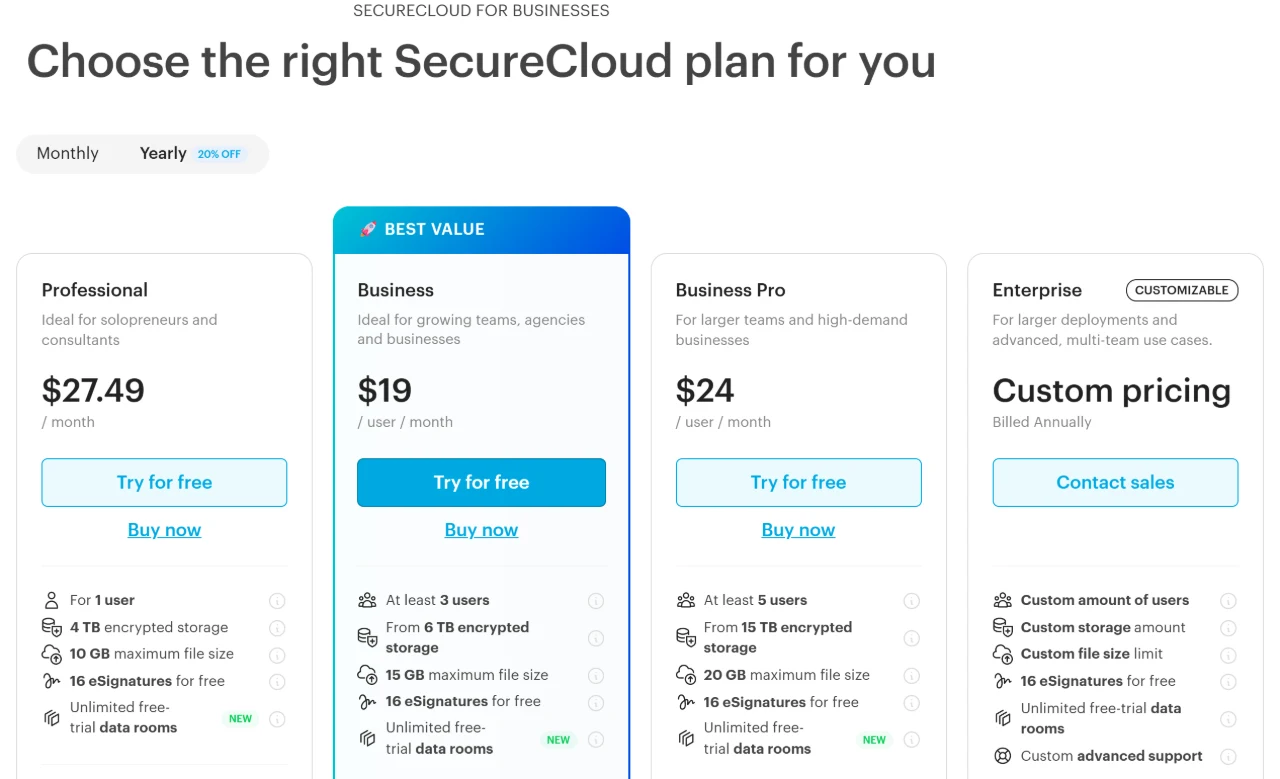
| Plan | Billed yearly | Billed monthly | Users | Storage |
|---|---|---|---|---|
| Professional | $27.49 a month | $33.99 a month | 1 | 4 TB, 10 GB per file |
| Business | $19 per user a month | $24 per user a month | 3 or more | From 6 TB, 15 GB per file |
| Business Pro | $24 per user a month | $30 per user a month | 5 or more | From 15 TB, 20 GB per file |
| Enterprise | Custom | Not offered | Custom | Custom |
Personal plans
| Plan | Billed yearly | Billed monthly | Storage | Devices |
|---|---|---|---|---|
| Basic | Free | Free | 3 GB, 500 MB per file | 2 |
| Personal Lite | $4.75 a month | $5.99 a month | 50 GB, 2 GB per file | 2 |
| Personal Essential | $11.99 a month | $13.99 a month | 1 TB, 10 GB per file | 10 |
| Personal Pro | $27.49 a month | $33.99 a month | 4 TB, 10 GB per file | 10 |
Sources: business pricing, personal pricing, Tresorit Basic.
Yearly billing saves about 20%. If you only need to send files, FileSharing Business costs $14.50 per user a month billed yearly, for three or more users.
Test it with real files first. Every paid plan comes with a 14-day free trial, so set a reminder to cancel if it isn't right.
Start a free trialHow Tresorit's encryption works
Tresorit encrypts every file and its details on your device, each with its own random key. Those keys never reach Tresorit's servers unencrypted, so the company says it can't read your data (source).
Your password never leaves your device either. When you share a folder, Tresorit uses public-key cryptography, including RSA-4096, so only the people you invite can decrypt it.
Tresorit holds ISO 27001:2022 certification, audited by TÜV Rheinland. It also signs HIPAA business associate agreements and says it handles data under Swiss privacy law.
Business and Enterprise customers can choose data centers in 11 countries, including the US, Canada, the UK, Germany and Switzerland. Everyone else is assigned to Ireland (source).
The password catch
Zero-knowledge encryption has a real downside. Tresorit doesn't store your password, so it can't recover it for you (source).
If you forget it while still signed in on a device, you can set a new one with an emailed code. If you're signed out everywhere, your only option is an account reset, which erases every file stored in your account (source).
Local synced copies survive a reset, so keep Tresorit syncing to at least one computer. On business plans, admins can turn on Advanced Control to reset team members' passwords, but nobody can reset the subscription owner's password.
Refunds and cancelling
Tresorit gives a full refund on a first purchase only if you bought directly, without a trial (source). You must ask within 7 days, or 14 days if you're in the EU.
You can cancel any time under Billing in your account, and your account drops to the free Basic plan. Basic holds only 3 GB, so move large folders out before the plan ends.
What users say about Tresorit
We checked these ratings on October 30, 2026:
- G2: 4.5 out of 5 from 267 reviews (source).
- Trustpilot: 2.3 out of 5 from 61 reviews, with 56% at 1 star and 31% at 5 stars (source).
Fans praise the security, and two reviewers said switching from Sync.com made their work smoother. Critics describe slow syncing that left duplicate file versions, and clients who struggled to download large files from links.
One reviewer said in October 2026 that the S3-compatible API listed on the pricing page still required joining a waiting list. Another said their account was deleted after a period of inactivity.
Who runs Tresorit
Tresorit was founded in 2011 and is now part of Swiss Post, Switzerland's national postal company. It has offices in Switzerland, Germany and Hungary, and István Hartung has been CEO since 2023 (source).
Tresorit says more than 11,000 organizations use it. Support is free by email and live chat on paid plans.
Tresorit pros and cons
Pros
- End-to-end, zero-knowledge encryption on every plan, including free
- ISO 27001 certified, with HIPAA agreements available
- Secure links with passwords, expiry dates and open limits
- Apps for every major platform, including Linux
- Data residency choices on business plans
- Free Basic plan and a 14-day trial of paid plans
Cons
- Forgotten passwords can't be recovered
- Business plans need at least 3 users
- Small storage on the cheapest personal plan (50 GB)
- The trial needs a card, and converted trials aren't refundable
- Some users report slow sync and duplicate files
- Engage data rooms cost extra
Who should skip Tresorit
- You often forget passwords. A lost password can mean lost files, so use a password manager or pick a cloud that can reset access for you.
- You only need backups. A backup service such as iDrive is built for copying whole computers and phones.
- You're a team of two. Business plans start at three users, so two people would need two Professional plans or a third seat.
- You want to try it without a card. Start with the free Basic plan instead of the trial.
- Your files aren't sensitive. If nothing you store is confidential, mainstream cloud storage gives you more apps and integrations.
Tresorit alternatives
| Tool | Pick it if you mainly need | More |
|---|---|---|
| Proton Drive | Encrypted storage from the company behind Proton Mail, with bundles that add its email and VPN | Proton Drive |
| Sync.com | Another zero-knowledge cloud for individuals and small teams | Sync.com |
| iDrive | Automatic backups of computers and phones rather than shared team folders | Our iDrive review |
| Google Drive or Dropbox | Live co-editing and large app ecosystems, without zero-knowledge encryption | Not reviewed yet |
We haven't reviewed Proton Drive, Sync.com, Google Drive or Dropbox yet.
If you also want private email for client work, our Fastmail review covers its plans and explains its encryption limits.
Verdict: is Tresorit worth it?
Tresorit is built for confidential files, with end-to-end encryption, ISO 27001 certification and sharing controls made for client work. Business at $19 per user a month suits small firms that send sensitive documents every week.
Pay for it only if you'll manage passwords carefully, since a lost password can mean lost files. Start with the free Basic plan or the 14-day trial, and set a reminder before the trial converts.
Tresorit FAQ
Is Tresorit free?
Yes. Tresorit Basic is free, with 3 GB of encrypted storage, files up to 500 MB and 2 devices. Paid plans also come with a 14-day free trial.
How much does Tresorit cost?
Personal plans start at $4.75 a month billed yearly. Business starts at $19 per user a month billed yearly, for at least three users. We checked these prices on October 30, 2026.
Can Tresorit see my files?
Tresorit says no. Files are encrypted on your device with keys it never receives unencrypted, which is what zero-knowledge means.
What happens if I forget my Tresorit password?
Tresorit can’t recover it. If you’re still signed in somewhere, you can set a new one. If not, an account reset erases your stored files.
Is Tresorit HIPAA compliant?
Tresorit signs HIPAA business associate agreements with customers who need them. Ask its sales team which plan fits your practice.
Can I get a refund from Tresorit?
Only on a first purchase made without a trial, within 7 days, or 14 days in the EU. Paid plans that start after a trial can’t be refunded.
Who owns Tresorit?
Tresorit is part of Swiss Post, Switzerland’s national postal company. It was founded in 2011.
More in Web Hosting & Infrastructure