


MoneyWika earns a commission if you buy through some links on this page, at no extra cost to you. How we make money
Vultr is a developer-focused cloud provider offering high-performance VPS, bare metal, and GPU servers across 34 data center regions, with hourly billing from as little as $2.50/month. We break down what it offers, the real 2026 pricing, and whether it is right for you.
Somewhere between the eye-watering complexity of AWS and the bare-bones budget VPS hosts sits a sweet spot: real cloud infrastructure, fair prices, and a control panel you can actually understand. Vultr has spent more than a decade building exactly that, and in 2026 it is one of the strongest options in the category.
Founded in 2014 and based in West Palm Beach, Florida, Vultr is an independent cloud provider that competes directly with DigitalOcean and Linode (now Akamai Cloud). It sells VPS ("Cloud Compute"), bare metal, cloud GPU, and object storage across 34 data center regions on six continents, all with transparent, hourly billing. The pitch is simple: hyperscaler-grade global reach and strong hardware, without hyperscaler pricing or complexity.
I dug into every plan tier, the real 2026 pricing and hidden costs, the performance data, and the honest trade-offs. Here is what Vultr actually offers and who should use it.
What Is Vultr and Who Is It For?
Vultr is a cloud infrastructure provider, or Infrastructure-as-a-Service (IaaS). In plain terms, it rents you virtual and physical servers by the hour that you configure and manage yourself. You get root access, a choice of operating systems (Linux and Windows), and the freedom to spin servers up and tear them down whenever you like, paying only for the hours you use.
Crucially, Vultr is an unmanaged service by default. That means it hands you powerful, well-priced hardware and a clean control panel, but you are responsible for setting up and maintaining your server. That makes it a natural fit for developers and technical teams, and a poorer fit for non-technical users who want a host to manage everything for them.
Ideal for
Developers, freelancers, and small-to-mid engineering teams who want flexible, globally distributed cloud compute, plus AI/ML teams needing affordable GPU instances.
Less ideal for
Beginners wanting fully managed hosting, non-technical WordPress owners, or teams that need hand-holding support and a mature managed-services catalog.
Vultr hits the balance between DigitalOcean's developer experience and budget-provider pricing, with one of the widest data-center footprints among the independent clouds.
What Vultr Offers
Vultr has expanded well beyond simple VPS hosting. Its lineup now covers everything from a $2.50 micro-instance to serious AI GPU compute, all on the same global network.
Cloud Compute
The core shared-CPU VPS line for websites, apps, bots, and staging, with a Regular tier on standard SSD and High Performance and High Frequency tiers on NVMe.
Optimized & VX1
Dedicated-vCPU instances for consistent production performance, including the newer VX1 line with up to 50 Gbps networking.
Bare Metal
Single-tenant physical servers with no virtualization overhead and no big upfront cost, from $120/month.
Cloud GPU
NVIDIA and AMD GPU instances and GPU bare metal for AI, ML, and rendering. DigitalOcean and Akamai (Linode) sell GPUs too, so compare models and hourly rates.
Kubernetes (VKE)
Managed Kubernetes with a free control plane, you pay only for worker nodes at standard Cloud Compute rates.
Storage & databases
Object storage, block storage, and managed databases round out the stack for full-application infrastructure.
Every instance includes root access, a full API, and Terraform support, plus Windows and a wide OS library. Servers deploy in seconds, and hourly billing means you stop paying once you destroy a server. This is genuinely developer-friendly infrastructure.
Performance: Strong Hardware for the Price
This is where Vultr shines. In a March 2026 comparison by Better Stack, Vultr offered more NVMe storage and more included bandwidth than DigitalOcean at the same price. At the $24/month shared-CPU tier, Vultr's High Performance AMD EPYC instance (100 GB NVMe, 5 TB transfer) beat DigitalOcean's Intel Xeon Basic Droplet (80 GB SSD, 4 TB) on both CPU and disk I/O. That was one round of tests in two different US regions, so treat it as a guide rather than a guarantee.
Its High Frequency line runs 3GHz+ Intel Xeon processors for latency-sensitive work, and the NVMe advantage shows up clearly in databases, caching layers, and any disk-heavy application. Vultr also backs a 100% uptime SLA with credit compensation (GPU instances are excluded), stronger on paper than DigitalOcean's 99.99% guarantee.
Two caveats. Shared-CPU plans share cores with other customers, so performance can dip under sustained load; test before running heavy production workloads on shared compute, or move to a dedicated-CPU plan. And for European projects, budget hosts like Hetzner are often cheaper for similar specs. Vultr is best value for North American and globally distributed workloads.
Vultr Pricing & Hidden Costs (2026)
Vultr's pricing is transparent and hourly, with no reserved-instance commitments. Each plan includes monthly bandwidth that is pooled across your account, inbound traffic is free, and extra outbound traffic costs $0.01 per GB. The headline $2.50 plan grabs attention, but there are important details. Here is the real breakdown.
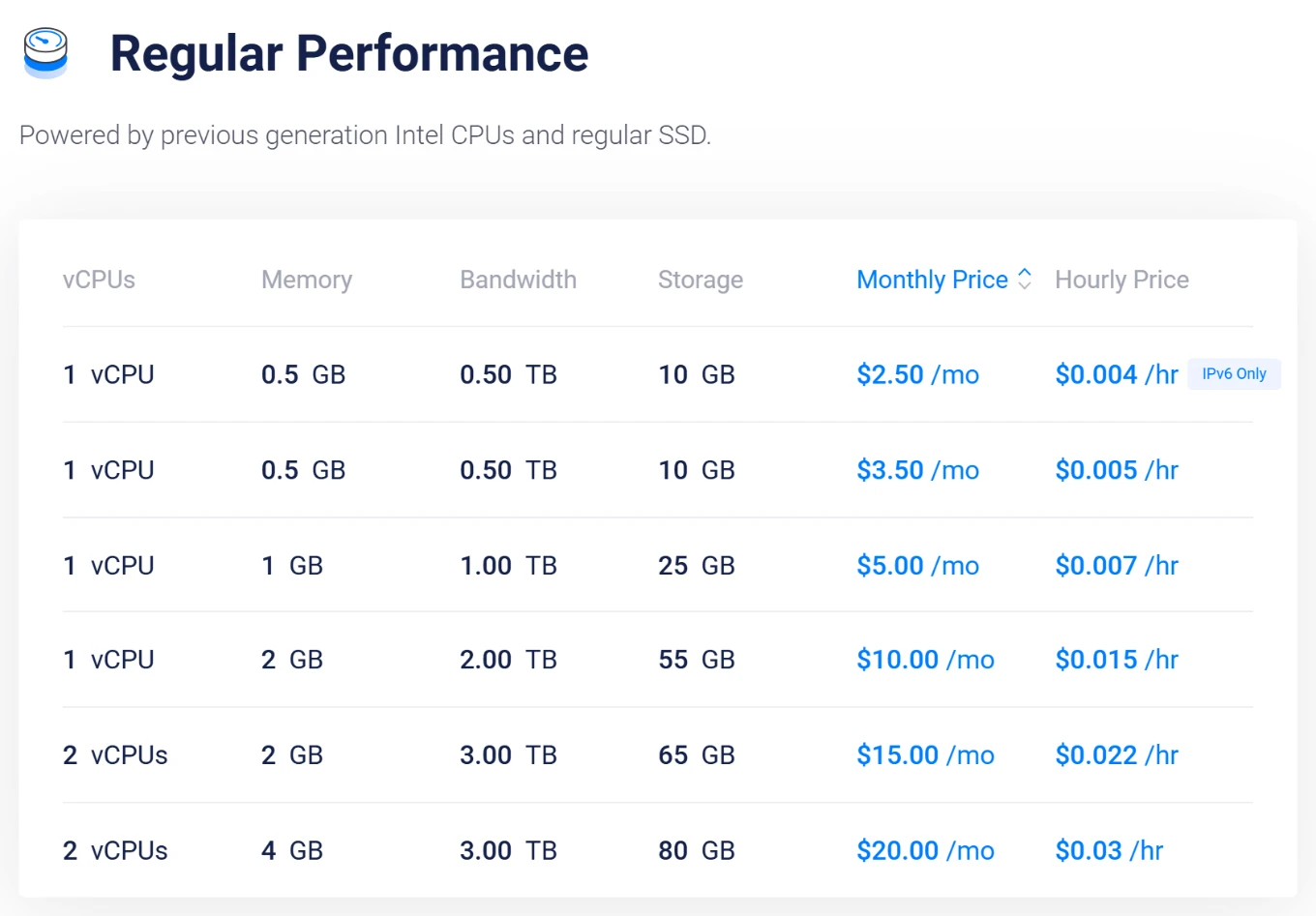
| Plan | From | Specs & notes |
|---|---|---|
| Cloud Compute (entry) | $2.50/mo | 512MB RAM, IPv6-only, limited regions |
| Cloud Compute (usable) | $5/mo | 1GB RAM, 1 vCPU, IPv4, widely available |
| High Performance (NVMe) | $6/mo | 1GB, AMD EPYC or Intel Xeon, NVMe, 2TB transfer |
| High Frequency | $6/mo | 1GB, 3GHz+ Intel Xeon, 32GB NVMe |
| Optimized Cloud Compute | $28/mo | Dedicated vCPU, 2GB (CPU Optimized); 4GB General Purpose from $30 |
| VX1 | $43.80/mo | 2 dedicated vCPUs, 8GB, up to 50 Gbps ($0.06/hr) |
| Bare Metal | $120/mo | Full single-tenant physical server |
For most real projects, the $5 (1GB) or $6 High Performance NVMe plan is the true starting point, not the $2.50 tier, which is IPv6-only and region-limited. New accounts that sign up through our link get $300 in credit to test the platform, and Vultr says its free credits last up to 30 days. You need a card or PayPal account on file, the credit applies to select products only, and only one promotion can be used per account, so read the terms before you rely on it.
The base price is not the whole story. Automated backups (20% of the server price), snapshots ($0.05 per GB a month), and DDoS protection ($10 a month per server) are paid add-ons, while DigitalOcean includes basic DDoS protection at no charge. A stopped server also keeps billing until you destroy it. Factor these in when comparing. As always, pricing and regional availability change often, so verify live rates on Vultr before buying. For a managed alternative pointed at WordPress, see our Cloudways review, which runs on Vultr's high-frequency servers.
Pros & Cons
👍 What we liked
- Excellent price-to-performance, more NVMe and bandwidth than DigitalOcean
- 34 data center regions on 6 continents, one of the widest indie-cloud footprints
- Transparent hourly billing, with pooled bandwidth and $0.01/GB overage
- Wide range of NVIDIA and AMD cloud GPUs
- 100% uptime SLA with credit-backed compensation (GPUs excluded)
- Root access, snapshots, API, and Terraform on every instance
- $300 free credit for new accounts (via our link)
👎 What to watch
- Unmanaged by default, you handle server setup and upkeep
- Leaner support reputation than DigitalOcean or Linode
- Backups, snapshots, and DDoS protection are paid add-ons
- Stopped servers keep billing until destroyed
- $2.50 entry plan is IPv6-only and region-limited
- Pricier than Hetzner for European workloads
- Managed services catalog less mature than DigitalOcean's
Who Should Use Vultr?
Choose Vultr if…
- You are a developer comfortable managing your own server
- You need global reach or specific data-center locations
- You want strong CPU and NVMe performance for the price
- You need affordable GPU compute for AI/ML work
- You want hourly billing and the freedom to scale up and down
Look elsewhere if…
- You want fully managed, hands-off hosting
- You are a non-technical WordPress or small-business owner
- Your workloads are entirely EU-based and cost-sensitive
- You rely heavily on responsive, hand-holding support
- You need a deep catalog of managed services
Vultr shines as raw infrastructure, but if you want its performance without managing servers yourself, a managed layer on top is the answer. Our Cloudways review covers a popular managed platform that runs on Vultr's high-frequency servers, and our Hosting.com review looks at a fully managed shared-hosting alternative. If you are weighing managed hosts head-to-head, our Cloudways vs SiteGround comparison is a useful next read.
Try Vultr with $300 free credit
New accounts that sign up through our link get $300 in credit, valid for up to 30 days. Spin up a server in seconds, benchmark it, and pay only for the hours you use after that.
Frequently Asked Questions
Vultr is best suited to developers and technically comfortable users, because it is an unmanaged service by default. You get powerful hardware and a clean control panel, but you are responsible for setting up and maintaining your server.
Complete beginners or non-technical WordPress owners are usually better off with a managed host, or with a managed layer like Cloudways running on top of Vultr's infrastructure.
Cloud Compute starts at $2.50/month, but that plan is IPv6-only and available in limited regions. The realistic starting point for most projects is the $5/month 1GB plan or the $6/month High Performance NVMe plan.
Other lines start at $6 for High Frequency, $28 for Optimized Cloud Compute, $43.80 for VX1 ($0.06 an hour), and $120 for Bare Metal. Remember that backups, snapshots, and DDoS protection are paid add-ons on top of the base price.
It depends on your priorities. For raw price-to-performance, Vultr usually wins, offering more NVMe storage, more included bandwidth, and stronger hardware at the same price, plus a wider data-center footprint.
DigitalOcean counters with a more mature managed-services catalog, better documentation and community tutorials, and a stronger support reputation. Developers who want value and reach lean Vultr; those who want polish and support lean DigitalOcean.
Yes. New accounts that sign up through our link get $300 in credit to test the platform, and Vultr says its free credits last up to 30 days. Its promotions page also lists a deposit match of up to $100 on your first top-up (one promotion per account). Separately, Vultr runs a limited Free Tier program: approved applicants get a free instance with 1 vCPU, 512 MB of RAM and 10 GB of storage in Miami, Seattle or Frankfurt, but places are limited and granted at random.
Check each offer’s terms and expiry, and plan to test actively rather than let the credit sit. It is more than enough to benchmark instances and evaluate the platform before committing real money.
Yes. Vultr backs a 100% uptime SLA with credit-based compensation covering both network and host-node availability. GPU instances are not covered by the SLA.
For compliance-sensitive teams, Vultr's compliance page lists a SOC 2+ (HIPAA) report, PCI merchant compliance, and ISO/IEC 27001:2022 certification, among others. As with any single provider, plan your own failover for critical workloads.
Yes. Vultr was founded in 2014 and is based in West Palm Beach, Florida. It says it has served more than 1.5 million customers in 150+ countries and deployed over 80 million cloud servers, and it runs 34 data center regions with SOC 2+ and ISO 27001 compliance listed on its site.
The usual caveats apply: it is unmanaged by default and its support is leaner than some larger rivals', so it suits people who can run their own servers.
The Verdict
Vultr has quietly become one of the best price-to-performance cloud providers around. It offers stronger hardware, more storage, and more bandwidth than DigitalOcean at the same price, spreads it across 34 data center regions, and adds GPU compute and bare metal, all with transparent hourly billing and cheap bandwidth overage.
The trade-offs are real but reasonable: it is unmanaged by default, support is leaner than the big names, and add-ons like backups and DDoS protection cost extra. None of that matters much if you are a developer who can run your own server, and it matters a lot if you are not. For technical users and teams who want hyperscaler reach without hyperscaler prices, Vultr is an easy recommendation. Claim the $300 credit, spin up an instance, and let your own benchmarks decide.
More in Web Hosting & Infrastructure