
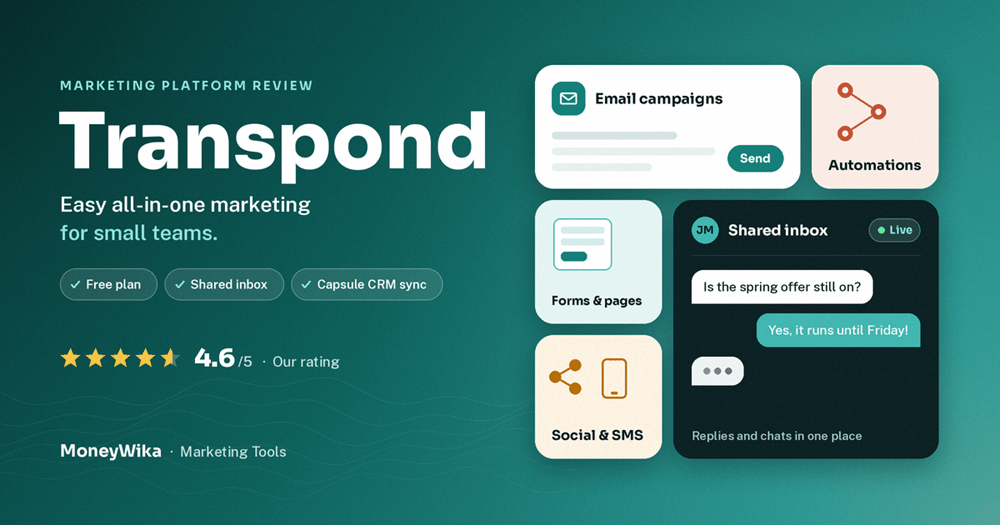
Transpond is an all-in-one marketing platform for small businesses that know they should be doing marketing but don't have a marketing team. It handles email campaigns, automations, signup forms, landing pages, social posts, SMS and a shared inbox for customer replies. It's built by the team behind Capsule CRM. This review covers what Transpond does, how each key feature works in practice, what it costs in 2026, and a walkthrough of how it can help different kinds of businesses, from a local shop to an agency managing several clients.
Most small business owners have the same marketing problem. They have a list of customers in a spreadsheet or CRM, they know they should be emailing them, and they keep putting it off because the tools feel built for someone with a marketing degree.
Transpond is designed for exactly that person. Its pitch is simple: if you know marketing matters but aren't sure where to start, it helps you take the next step without a steep learning curve. You can send your first campaign the same day, using a branded template or a draft written by its AI assistant.
It's not a brand-new product. Transpond grew out of MPZMail, an email tool that has been around for years, and it's now developed by the same company that makes Capsule CRM. That background shows in how well it handles contact data.
What Transpond is
Transpond is an all-in-one marketing platform that lets small and medium-sized businesses grow their audience, send campaigns and manage customer conversations from one place.
Its features fall into three groups, and they map neatly onto how a customer relationship actually works:
| Stage | What Transpond gives you | The goal |
|---|---|---|
| Grow your audience | Signup forms, landing pages, social scheduling | Turn visitors into contacts |
| Drive engagement | Email campaigns, automations, AI writing help, SMS, analytics | Stay in touch without having to remember |
| Manage conversations | Shared inbox for replies, live chat on your website | Be there when people respond |
That last group is what sets Transpond apart from many email tools. Most platforms send messages and leave the replies to your normal inbox. Transpond pulls replies and website chats into one place, which matters a lot for businesses where an email reply is often a sales enquiry.
Key features and how they work
Here's each main feature, what it does, and what using it actually looks like.
Campaign builder
A drag-and-drop editor for newsletters, promotions and updates that work on desktop and mobile. You can send to your whole list or to specific groups.
How it works: pick a template, swap in your logo, text and images, choose a list or segment, then send now or schedule it.
Automations
Set up simple rules once and they run on their own, such as "send this when someone signs up" or "follow up three days later".
How it works: choose a trigger, like a new signup or a Stripe customer, add delays and emails, then switch it on. Starter includes 1 automation; Growth and above are unlimited.
AI Content Assistant
Helps you write subject lines and email copy in your own tone, so you never start from a blank page.
How it works: describe what you want to say, generate a draft, then edit it. Treat it as a first draft, not a finished email.
Signup forms and landing pages
Simple forms for your website and ready-made landing pages. Everyone who signs up is saved to your contacts automatically.
How it works: build a form, paste the code into your site or share the landing page link, and connect it to a welcome automation.
Social campaigns
Schedule posts to Facebook, Instagram, LinkedIn and X from the same place you manage email.
How it works: connect your accounts, write a post once, and schedule it across channels for the week ahead.
Conversations and live chat
Email replies and website chats land in one shared inbox, and common questions can be answered automatically when you're away.
How it works: add the chat widget to your site, assign team members, and reply to customers without switching tools.
SMS campaigns
Add text messages when it makes sense for your business, from the same contact list.
How it works: SMS is a paid add-on. Recent UK comparisons list it as available to UK customers only, so check availability in your country.
Analytics
See which messages are opened, clicked and replied to without digging through complex reports.
How it works: open a campaign to see results, then use split tests on Growth and above to compare subject lines.
Integrations
Transpond connects natively with Capsule (real-time contact sync), plus CRMs like Pipedrive, HubSpot, Zoho, Salesmate and Microsoft Dynamics. It also works with Stripe for automated customer emails, Slack for notifications, WordPress, and Zapier for thousands of other apps. There's no native Shopify or WooCommerce connection, so online stores need Zapier.
If your sales team lives in a CRM, connect it before anything else so your lists stay accurate without manual imports. Our Close CRM review covers a sales-focused option, and our Make.com review shows how to connect tools that don't integrate directly.
How Transpond can help your business
Features only matter if they fit how you work. Here's how five different kinds of businesses could use Transpond, step by step.
Local and small businesses
Shops, salons, cafés, trades, clinicsYou want repeat customers but don't have time to plan campaigns every week.
- Add a signup form to your website and a QR code at the till that links to a landing page.
- Set up a welcome automation with a small offer for new subscribers.
- Send one simple monthly newsletter with news, offers and seasonal reminders.
- Schedule the same update to Facebook and Instagram in the same sitting.
B2B teams and Capsule CRM users
Consultancies, service firms, SaaS sales teamsYour contacts already live in a CRM, and marketing needs to stay in step with sales.
- Connect Capsule or your CRM so contacts and tags sync automatically.
- Build segments by deal stage or industry, so each group gets relevant emails.
- Create a follow-up automation for new leads that hands warm replies to sales.
- Use the shared inbox so a reply to a campaign doesn't get lost in one person's email.
Coaches, course creators and consultants
One-person businesses selling expertiseYour email list is your most valuable asset, and nurturing it turns readers into clients.
- Offer a free guide or checklist on a Transpond landing page.
- Deliver it with an automated email, then follow with three or four helpful emails over two weeks.
- Invite engaged readers to book a call or join your course. Our Teachable review covers hosting the course itself.
- Add live chat to your sales page to answer questions while people are deciding.
Subscription and SaaS businesses
Products that bill through StripeYou need onboarding and retention emails that react to what customers actually do.
- Connect Stripe so new customers are added to Transpond automatically.
- Trigger an onboarding sequence that explains your product's key features.
- Send a check-in to customers who haven't engaged in a while.
- Post updates to Slack when important campaigns go out, so the team knows.
Agencies and resellers
Managing marketing for several clientsYou want one platform for all clients, ideally under your own brand.
- Use Transpond's white-label option for agencies and resellers to offer the platform under your name.
- Set up branded templates for each client so campaigns stay on-brand.
- Schedule each client's email and social content from the same dashboard.
- Share simple analytics with clients each month to show what's working.
The best marketing plan for a small business is the one that keeps running when you're busy. That's what automations are for.
Consistency matters more than clever campaigns. We plan our content and campaign dates in RytePad, which works as a planner with schedules and reminders, so the monthly newsletter actually goes out every month.
Transpond pricing in 2026
Transpond has a free plan and four paid plans. Prices scale with the number of contacts, so the figures below are starting prices at the smallest list size. Transpond's pricing page loads its figures dynamically and shows them in your local currency, so check it for your exact price.
- 1 user
- Email campaigns
- No automation
- 3 users
- 1 automation
- AI assistant, live chat
- SMS add-on
- 5 users
- Unlimited automations
- A/B split tests
- Multiple social accounts
- 10 users
- AI assistant for your website
- Web tracking, 10 sites
- Unlimited users
- All features
- Conversations reporting
For most small businesses, Growth is the plan to choose. Starter only includes one automation, which you'll outgrow as soon as you want both a welcome series and a follow-up. Growth adds unlimited automations and split testing for about $11 more a month.
Third-party sources report slightly different starting prices, from about $10 to $11 for Starter and £7 to £8 in the UK, depending on billing period and currency. All plans rise as your contact count grows. Use these as a guide and confirm on Transpond's pricing page before you buy.
Transpond vs Mailchimp, Brevo and ActiveCampaign
Transpond positions itself as cheaper than Mailchimp with similar capabilities, and it will even migrate your Mailchimp data for you. Here's how it fits among the tools we've reviewed:
| Transpond | Mailchimp | Brevo | ActiveCampaign | |
|---|---|---|---|---|
| Billed by | Contacts | Contacts | Emails sent | Contacts |
| Shared inbox + live chat | Yes | No | Live chat | Via add-ons |
| Social scheduling | Yes | Yes | Limited | Limited |
| Automation depth | Simple, easy | Moderate | Simple | Very deep, AI-led |
| Best for | Small teams, CRM users | General small business | Many small lists | Complex journeys |
If you want the simplest all-in-one tool with replies and chat built in, Transpond is a strong pick. If you send lots of email to many small lists, our Brevo review explains why send-based pricing can be cheaper. For advanced automation and AI that manages campaigns for you, see our ActiveCampaign review, and our ActiveCampaign vs Mailchimp comparison covers the Mailchimp side in depth.
Your first week with Transpond
| Day | What to do |
|---|---|
| Day 1 | Import your contacts or connect your CRM. Moving from Mailchimp? Ask Transpond to migrate your data. |
| Day 2 | Set up your branded template with your logo, colours and footer details. |
| Day 3 | Create a signup form and put it on your website's homepage and contact page. |
| Day 4 | Build a welcome automation of two or three emails for new subscribers. |
| Day 5 | Write your first newsletter, using the AI assistant for a first draft. |
| Day 6 | Connect your social accounts and schedule a week of posts. |
| Day 7 | Check your analytics and note which subject lines and links performed best. |
Send campaigns from your own domain and set up SPF and DKIM so emails don't land in spam. Use a separate, normal mailbox for one-to-one conversations, like the ones in our Fastmail review. For higher-converting pages, our Leadpages review covers a dedicated landing page builder.
Pros and cons
👍 What we like
- Very easy to learn, even with no marketing experience
- Email, automation, forms, social and chat in one place
- Shared inbox and live chat for customer replies
- Real-time sync with Capsule CRM and other CRMs
- Free plan and low starting prices
- Mailchimp data migration offered
- White-label option for agencies and resellers
👎 What to watch
- No automation on the free plan, only one on Starter
- No native Shopify or WooCommerce integration
- SMS is a paid add-on with limited country availability
- Automation is simpler than ActiveCampaign's
- Prices rise as your contact list grows
- Smaller template and integration library than the biggest tools
Start marketing today, not someday
Transpond brings email, automations, forms, social posts and customer conversations together in one easy platform. Start free with up to 250 contacts, then upgrade when you're ready to automate.
Free plan available · built by the Capsule CRM team · Mailchimp migration offered
Frequently asked questions
Transpond is an all-in-one marketing platform for small and medium-sized businesses. It includes email campaigns, automations, signup forms, landing pages, social media scheduling, SMS, an AI writing assistant, and a shared inbox with live chat.
It's built by the team behind Capsule CRM and grew out of the earlier MPZMail email platform.
There's a free plan for up to 250 contacts and 3,000 sends a month. Paid plans start at roughly $10 to $11 a month for Starter, about $22 for Growth, $60 for Advanced and $99 for Ultimate, at the smallest list size.
Prices scale with your number of contacts and vary by currency, so check Transpond's pricing page for your exact figure.
Yes. The free plan supports up to 250 contacts and 3,000 sends a month for one user. It doesn't include automations, so upgrade to Starter or Growth if you want automated welcome or follow-up emails.
Transpond positions itself as offering similar capabilities to Mailchimp at better value, and it offers to migrate your existing Mailchimp data. For small lists its paid plans start lower than many alternatives.
The exact saving depends on your list size and features, so compare both at your contact count.
Yes. Transpond is built by the Capsule team, and contacts sync between the two in real time. It also integrates with CRMs such as Pipedrive, HubSpot, Zoho, Salesmate and Microsoft Dynamics, plus Stripe, Slack, WordPress and Zapier.
Yes. Transpond offers a white-label option for agencies and resellers, so you can provide the platform to clients under your own brand and manage their email and social campaigns from one place.
The verdict
Transpond does what it promises: it makes marketing approachable for businesses without a marketing team. Email, automations, forms, landing pages, social posts and SMS all live in one tidy platform, and you can send a good-looking campaign on day one.
Its standout strength is what happens after you send. The shared inbox and live chat keep customer replies in one place, which is exactly where many small businesses lose sales. Real-time Capsule sync and solid CRM integrations make it especially good for B2B teams.
It isn't the most powerful automation platform, and online stores will miss native Shopify or WooCommerce. But for small businesses, consultants, B2B teams and agencies that want something easy and affordable, Transpond is one of the most practical choices available. Start free, then move to Growth when you're ready to automate.
Feature details come from Transpond's official website as of October 2026. Pricing comes from recent third-party listings, because Transpond's pricing page loads figures dynamically by currency and list size; figures may differ for your account. The Capterra rating reflects reviews available at the time of writing. SMS availability is reported in recent UK comparisons and may change. Always confirm current details on transpond.io before subscribing. This page contains affiliate links, which means we may earn a commission at no extra cost to you if you sign up through them. Our opinions are our own.