

MoneyWika earns a commission if you buy through some links on this page, at no extra cost to you. How we make money
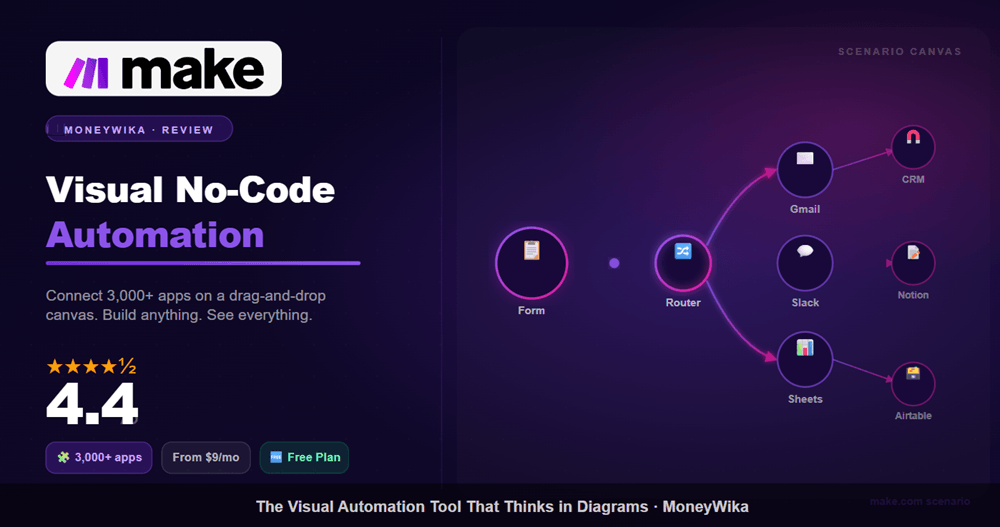
Make (formerly Integromat) is the visual, no-code way to connect 3,500+ apps and automate your busywork. Here is how it works, what it costs, and whether it is worth it.
If you have ever wished your apps could talk to each other without you copying data between them by hand, that is exactly the problem Make.com solves. It is a no-code automation platform, and its signature feature is a visual canvas where you literally see your data flow from one app to the next.
Make (which was called Integromat until 2022, and has been owned by process-mining company Celonis since 2020) sits in the same category as Zapier, but it takes a different philosophy. Zapier is built first for quick, linear "when this, then that" automations (it has added branching paths too). Make is built for the messier, branching, multi-step logic that real business processes actually require. That difference shapes everything, from the learning curve to the pricing.
In this review I will cover what Make is for, how it actually works, its 2026 pricing and the credit system you need to understand, how it compares to Zapier, and, most importantly, whether it is the right tool for you. Let us get into it.
What Is Make.com and Who Is It For?
Make.com is a visual, no-code automation platform that connects the apps and services you already use so they can pass data and trigger actions automatically. You build workflows, which Make calls scenarios, by dragging app modules onto a canvas and wiring them together. No code required, though the platform does let advanced users drop in JavaScript or Python when they need to.
The practical value is simple: it removes repetitive manual work. New form submission should create a CRM contact, send a Slack alert, and add a row to a spreadsheet? Make does all three automatically the moment the form comes in, and keeps doing it forever.
Ideal for
Technical marketers, operations teams, agencies, and SMBs that run multi-step processes with conditional logic, and want cost-effective automation at scale.
Less ideal for
Complete beginners who want the fastest possible "few clicks" setup, or teams that need the absolute widest app catalog. Zapier tends to win those cases.
Zapier gets automation off the ground fast. Make is built for what comes next: branching logic you can actually see.
How Make Actually Works
Everything in Make happens inside a scenario, its word for an automated workflow. A scenario is a chain of modules (each module is one action in one app) laid out visually on a canvas. Here is the basic flow of building one.
Pick a trigger
Choose what starts the scenario, a new email, a form entry, a schedule, or an instant webhook.
Add modules
Drag in the apps and actions that follow, connecting your accounts and mapping data between them.
Add logic
Insert routers to branch, filters to gate, and iterators to loop over lists, all visible on the canvas.
Run & monitor
Test with real data, watch bundles move through step by step, then schedule it to run automatically.
What sets Make apart is that this is graph-based, not strictly linear. One trigger can split into several conditional paths, each doing something different, and you can watch data travel through the whole thing in real time. That visual debugging is genuinely one of the best in the industry; when something breaks, you can see exactly which module failed and why.
Scenario = your workflow. Module = one step/action. Router = splits into branches. Filter = only continues if a condition is met. Iterator = loops over a list item by item. Learn these five words and Make suddenly makes sense.
Key Features in 2026
3,500+ app integrations
Connect Gmail, Slack, Google Sheets, Notion, HubSpot, Shopify, and thousands more, often with deeper actions per app than rivals offer.
Make AI Agents
The new AI Agents app arrived in February 2026 as an open beta on every plan, Free included, when you use Make's AI Provider, alongside an AI Toolkit and a large library of AI app connections for building agentic, decision-making scenarios. AI usage consumes credits.
Routers, filters & iterators
Real branching logic: split a workflow into parallel paths, gate steps by condition, and loop over arrays, all on the free plan. Routers and filters don't even use credits.
Custom API & webhooks
An HTTP module and webhook support let you connect virtually any app with a public API, even ones without a prebuilt integration.
Code when you need it
Drop in JavaScript or Python via the Make Code app (paid plans; it uses 2 credits per second of run time) for custom logic, data cleanup, and transformations beyond the standard modules.
Enterprise-grade security
SOC 2 Type II and SOC 3 reports, ISO 27001 certification, GDPR adherence, AES-256 encryption at rest, and TLS 1.2/1.3 in transit, running on AWS.
Pros & Cons
👍 What we liked
- Best-in-class visual builder and real-time debugging
- Usually cheaper than Zapier for complex, high-volume workflows
- Powerful branching, looping, and conditional logic
- Generous free plan (1,000 credits/month, no time limit)
- AI Agents and AI tools available on every plan, Free included
- Deeper per-app actions than most competitors
👎 What to watch
- Steeper learning curve than Zapier for beginners
- The credit system can burn faster than expected, especially with polling triggers and loops
- Fewer total app integrations than Zapier (3,500+ vs 9,000+)
- Complex scenarios can get hard to read
- Overage credits cost about 25% more than included ones
Make.com Pricing & the Credit System (2026)
For US visitors, Make offers five tiers: Free, Core, Pro, Teams and Enterprise. Paid plans can be billed monthly or annually, and annual billing saves about 25% (prices checked October 26, 2026). Make now shows different plans and prices by region: in some countries the pricing page lists a single "Make Plan" from $9 a month for 5,000 credits instead, so check what Make shows you.
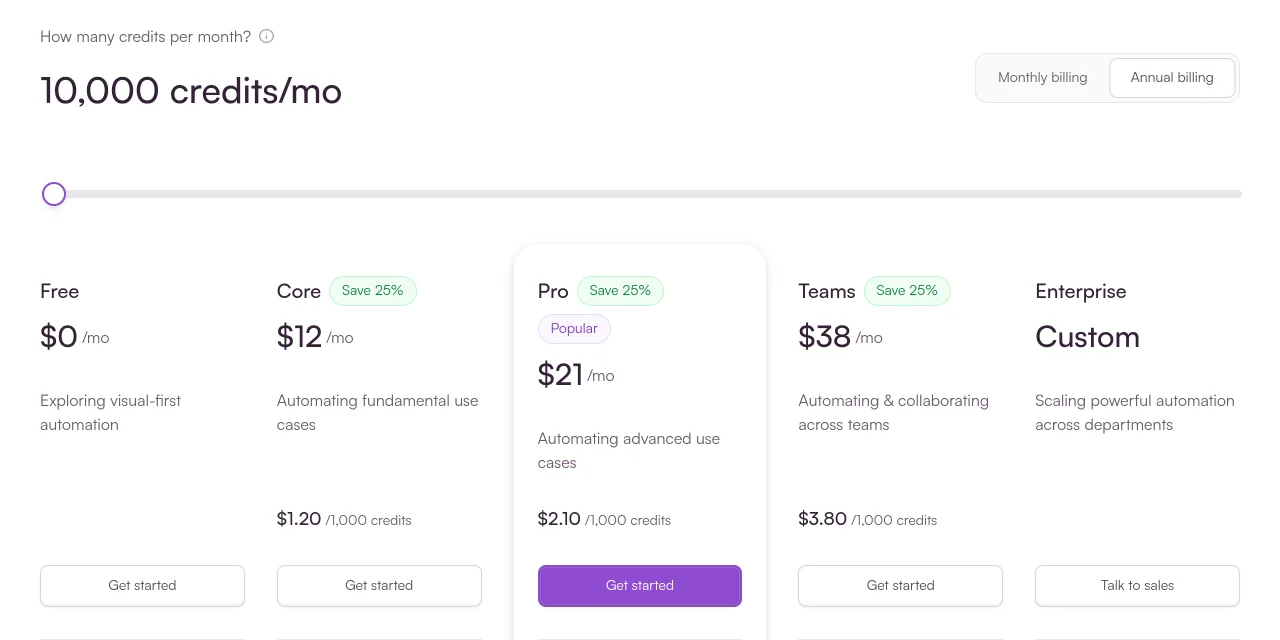
| Plan (US) | Price per month (annual / monthly billing) | Credits/mo | Best for |
|---|---|---|---|
| Free | $0 | 1,000 | Testing, learning, tiny workflows |
| Core | $12 / $16 | 10,000 | Solo operators & most SMBs |
| Pro | $21 / $28 | 10,000 | Priority execution, custom variables, full-text log search |
| Teams | $38 / $51 | 10,000+ | Multiple people building scenarios, with team roles |
| Enterprise | Custom | Custom | SSO, audit logs, 24/7 enterprise support |
Here is the single most important thing to understand about Make's pricing. In August 2025 it renamed its billing unit from "operations" to "credits," but the math is the same: every module that runs consumes one credit per bundle it processes, including the trigger (even when it finds nothing new) and each loop iteration. Routers, filters and error handlers are free. A five-step scenario spends about five credits every time it runs.
Because triggers count on every check, and iterators multiply, credits vanish faster than the headline "10,000" suggests. A scenario that polls an app every few minutes burns credits even when there is nothing to do. The fix: use instant webhooks instead of polling where possible, and design lean scenarios. Lean, webhook-driven scenarios can use far fewer credits than polling ones.
The takeaway on value: Make is one of the cheapest serious automation platforms you can buy, and Core at $12 a month (billed annually in the US) offers one of the best price-to-power ratios in hosted automation, as long as you understand the credit model. If you consistently need 80,000+ credits a month, it is worth pricing out a self-hosted alternative.
Make vs Zapier: The Honest Take
This is the comparison everyone wants, so here is the short version. Zapier is easier and connects to more apps (9,000+ vs Make's 3,500+). Make is more powerful, more visual, and usually cheaper for complex work.
| Factor | Make.com | Zapier |
|---|---|---|
| Interface | Visual canvas (graph) | Linear step list |
| Learning curve | Steeper | Gentler |
| App integrations | 3,500+ | 9,000+ |
| Branching & logic | Excellent | Good (improving) |
| Pricing model | Per module (credit) | Per task (action) |
| Cost for complex flows | Usually cheaper | Rises fast at scale |
| Starting paid price | $12/mo (Core, US, annual) | $19.99/mo (Professional) |
| Best at | Complex, branchy automation | Fast, simple automation |
One nuance worth knowing: because Make counts every trigger check as a credit while Zapier does not count triggers as tasks, Make's price advantage shrinks in practice. For a polling-heavy or loop-heavy workflow, Zapier's task model can occasionally end up simpler to budget. Price one real workflow both ways before committing, that single test tells you more than any pricing table. On the free tiers, Make gives you 1,000 credits a month with multi-step scenarios, while Zapier's free plan allows 100 tasks a month and two-step Zaps only.
Who Should Use Make.com?
Choose Make if…
- Your workflows branch, loop, or have conditional logic
- You want the most cost-effective platform at moderate-to-high volume
- You value visual clarity and strong debugging
- You are a technical marketer, agency, or ops team
- You want AI agents included, not sold separately
Look elsewhere if…
- You are a total beginner wanting the fastest setup
- You need an app that only Zapier's larger catalog supports
- You run mostly simple, linear "if this, then that" tasks
- You burn 80,000+ credits/month (consider self-hosting)
- You want zero cost-management overhead
Make pairs especially well with the tools you are probably already running. If you use email marketing, its native integrations make it easy to sync leads and trigger campaigns; our ActiveCampaign review covers a platform that connects to Make cleanly. And if you are automating content workflows, tools like RytePad for writing and MarkSurge for marketing execution fit alongside a Make-based workflow (disclosure: Rajan built RytePad and co-founded MarkSurge), see our full RytePad review for how that side of the stack fits together.
Ready to automate the busywork?
Make's free plan gives you 1,000 credits a month with no time limit, enough to build a real scenario and see the credit system for yourself before you pay a cent.
Frequently Asked Questions
Yes. Make offers a permanently free plan with 1,000 credits per month, its 3,500+ standard app integrations, and the full visual builder, with no time limit on how long you can stay on it.
The trade-offs are real, though: you are capped at 2 active scenarios and a 15-minute minimum interval between runs, and data transfer is limited. That makes the free plan best for testing and learning rather than production work.
Most real, multi-step workflows outgrow it fairly quickly, at which point Core ($12 a month billed annually in the US, or $16 month to month) is the natural upgrade.
Zapier uses a linear "trigger then actions" model and is easier for beginners, with 9,000+ app integrations. Make uses a visual canvas built for branching, looping, and complex logic, with 3,500+ integrations but often deeper actions per app.
On cost, Make is usually cheaper for complex or high-volume workflows, while Zapier is faster to set up for simple ones. The billing models differ too: Make counts every module run (including each trigger check) as a credit, while Zapier only charges for "work" actions.
In short, pick Make for power and price on complex flows, and Zapier for speed and simplicity on straightforward ones.
A credit is consumed every time a module runs in a scenario, including each trigger check and each iteration of a loop. Routers, filters and error handlers don't use credits. Make renamed "operations" to "credits" in August 2025, but the math is the same: a five-step scenario spends about five credits per run.
Most standard actions cost one credit, while some AI-powered features cost more. This is why complex, branchy, or polling-heavy scenarios burn through credits faster than the plan's headline number suggests.
The practical fix is to design lean scenarios and favor instant webhooks over polling wherever your apps support them.
Yes. Make is a long-running platform (it launched as Integromat and has been owned by Celonis since 2020) with SOC 2 Type II and SOC 3 reports, ISO 27001 certification and GDPR adherence. Data is encrypted with AES-256 at rest and TLS 1.2/1.3 in transit, on AWS infrastructure.
The part you control is access: each app you connect gives Make the permissions you grant it, so connect accounts with the narrowest access that does the job.
No. Make is a no-code platform, so you build everything by dragging modules onto a canvas and mapping data between them.
That said, it has a steeper learning curve than Zapier, and understanding a few core concepts (scenarios, modules, routers, filters, iterators) makes a big difference in how quickly you become productive.
Advanced users can optionally add JavaScript or Python via the Make Code app, but the vast majority of workflows need no code at all.
For the right user, yes. If your workflows involve branching logic or run at moderate-to-high volume, Make is one of the most cost-effective automation platforms available, and its visual builder is best in class.
That value holds as long as you understand the credit system and design lean scenarios. If you only run simple, linear automations or want the absolute easiest setup, Zapier may serve you better.
The smart move is to build one real workflow on Make's free plan and watch your credit usage for a week before committing to a paid tier.
The Verdict
Make.com earns its reputation. It is the automation platform for people who have outgrown "when this, then that" and need real logic they can see and debug. The visual canvas is genuinely excellent, the branching and looping are powerful, and the pricing is aggressive, frequently a fraction of what Zapier charges for equivalent complex work.
The two caveats are the learning curve and the credit system. Neither is a dealbreaker, but both reward attention. Spend an afternoon learning the vocabulary, design lean scenarios that avoid unnecessary polling, and Make becomes one of the highest-leverage tools in your stack. Start on the free plan, build one real workflow, watch your credits, and let your own usage decide the tier. For most technical marketers, agencies, and ops teams, it is an easy recommendation.
More in Email Marketing & Automation
- ActiveCampaign vs Mailchimp: Which Is Better for Small Business?
- ActiveCampaign Review (2026): Is Autonomous AI Worth It?
- Brevo Review 2026: How We Automate Lead Follow-Up (Real Results)
- Hunter.io Review 2026: Pricing, Credits and Email Verification
- Transpond Review 2026: Features, Pricing and Who It’s Best For