

MoneyWika earns a commission if you buy through some links on this page, at no extra cost to you. How we make money
MoneyWika is an Amplemarket partner and may earn from this post.
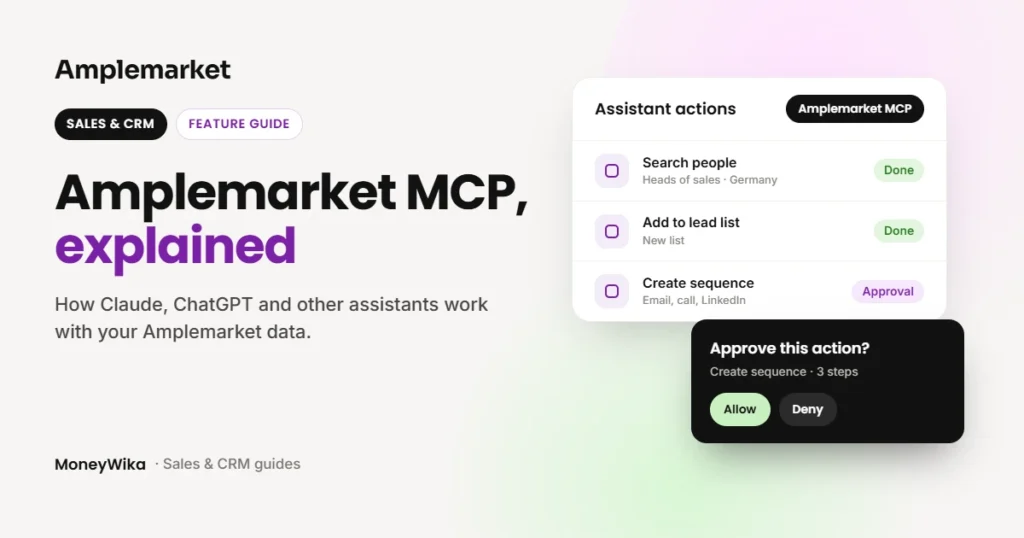
Amplemarket MCP connects AI assistants to your Amplemarket account. You can ask Claude, ChatGPT or Cursor to find prospects, build sequences or check tasks, and it works with your live data.
It suits sales teams that already work inside an AI assistant. Amplemarket lists it on its Startup, Growth and Elite plans, and sign-in uses OAuth instead of API keys.
One thing to know first: the connection has read and write access to your account. Your assistant can change things, so decide who connects it and which actions need approval.
Amplemarket MCP at a glance
- Best for
- Sales teams that already use Claude, ChatGPT or Cursor
- What it does
- Gives AI assistants more than 50 Amplemarket tools
- Works with
- Claude, Claude Code, ChatGPT, Cursor, Grok Bot and other remote MCP clients
- Sign-in
- OAuth, with no API keys
- Plans
- Listed on Startup, Growth and Elite
- Rate limit
- 100 requests per minute per user
- Watch out for
- Read and write access to your account
How we researched this: on October 26, 2026, we read Amplemarket's MCP page, launch post, help center guide and monthly product updates. We haven't connected it to an Amplemarket account ourselves, so the details come from Amplemarket's documentation (see how we review software).
On this page: What it is · What it can do · Setup · Example requests · Limits · Our take · FAQ
What Amplemarket MCP is
MCP stands for Model Context Protocol. It is an open standard that lets AI assistants use outside tools and data through one connection.
Amplemarket's MCP server gives your assistant access to your Amplemarket account. The assistant works with your live data and acts with your own user permissions.
Amplemarket launched it on March 6, 2026, with support for Claude and ChatGPT. Its integration page calls it "one of the first sales platforms to ship a production MCP server."
What it can do
Amplemarket says the server now has more than 50 tools. They cover search, enrichment, contacts, accounts, exclusion checks, lead lists, sequences, workflows, analytics, Duo, the Unibox inbox, personas, tasks and calls.
- Prospecting and research. Search for people and companies, enrich contacts and check them against your exclusion lists before outreach.
- Sequences. Build sequences with email, call and LinkedIn steps, using templates or copy written for each lead. Since September 2026, you can also launch, pause, resume, archive and unarchive them. An older help center guide still says launching needs the Amplemarket dashboard.
- Inbox and personas. Tools for both arrived in June 2026.
- Saved searches and Duo leads. Added in July 2026. Duo leads come from Duo Copilot, Amplemarket's AI sales assistant.
- Tasks. Added in August 2026, together with a connector for Grok.
- Call logs and battlecards. Added in September 2026. If your team calls from Amplemarket, our Parallel Dialer guide explains how those calls are made.
- Skills library. Amplemarket publishes ready-made skills for common sales jobs, also on GitHub. Its skills page lists 38 across 10 categories.
Interested in Amplemarket MCP? Amplemarket lists it on the Startup, Growth and Elite plans.
Visit AmplemarketHow to connect it
Amplemarket's help center has guided setup for the most common assistants:
- Claude: in Amplemarket, open Settings, then Integrations, then Claude. Click Connect, then approve the access request.
- ChatGPT: open Settings, then Integrations, then ChatGPT. Install the plugin, sign in and approve.
- Cursor and Grok Bot: Amplemarket has a guided setup for each.
- Other assistants: add
https://mcp.amplemarket.com/mcpas a custom connector in any client that supports remote MCP servers. Amplemarket's integration page also lists Claude Code.
Sign-in uses OAuth, so there are no API keys to create or store. Amplemarket recommends using larger AI models with it rather than small ones.
Example requests
These are illustrative requests based on the tools Amplemarket documents. What you get back depends on your data, your plan and your assistant.
- "Find heads of sales at software companies in Germany and save them to a new lead list."
- "Check these contacts against our exclusion list before we reach out."
- "Build a three-step sequence for this list with an email, a call and a LinkedIn step."
- "Show me today's Duo leads."
- "List my open tasks for this week."
- "Pause the sequence called Q4 webinar follow-up."
Permissions and limits
The server requests read and write access to your Amplemarket account, and it acts with each user's own permissions. Amplemarket's help center notes that Claude asks for approval before actions such as searches, enrichment and changes.
- Rate limit: 100 requests per minute per user.
- Workflows: admin-only. The assistant can draft up to 25 a day per user, but you turn them on in the app.
- Sequences: linear only, with no webhook steps, and you can't delete steps through MCP.
- Tasks: completing a task through MCP only marks it done. It doesn't send the email, place the call or take the LinkedIn action.
- Grok: drafts only, and nothing goes out until you approve it.
- Claude directory: Amplemarket's help center says it is working on a listing in Claude's Connectors Directory.
Where it helps
- Works inside the assistant your team already uses
- OAuth sign-in with no API keys
- More than 50 tools across prospecting, sequences, inbox and tasks
- A ready-made skills library
What to watch
- Read and write access to your account
- Workflows are admin-only and go live in the app
- Sequences built through MCP are linear only
- Completing a task doesn't carry it out
Skip it if your team doesn't use an AI assistant for work yet. Also wait if your security team hasn't approved AI tools with write access to sales data.
Want to automate steps between apps without an AI assistant? Our Make.com review covers a visual automation tool. For an AI agent built into a CRM, see our review of Chloe by Close.
Our take: worth connecting if your reps already work in an AI assistant
Amplemarket MCP suits teams that already use Claude, ChatGPT or Cursor every day. It brings prospecting, sequences and tasks into the assistant your reps already use.
Start with lookups like search and research. Add write actions, such as building and launching sequences, once your team is comfortable with the approvals.
Amplemarket MCP FAQ
What is Amplemarket MCP?
It is a Model Context Protocol server that connects AI assistants to your Amplemarket account. The assistant can search, research and enrich, and act on lists, sequences, inbox and tasks with your live data.
How do I connect Amplemarket to Claude?
In Amplemarket, go to Settings, then Integrations, then Claude, and click Connect. Then approve the access request.
Does it work with ChatGPT and other assistants?
Yes. Amplemarket has guided setup for ChatGPT, Cursor and Grok Bot. Any client that supports remote MCP servers can connect with the server URL.
Do I need an API key?
No. Amplemarket MCP uses OAuth sign-in, so there are no API keys to create or store.
Which Claude plans support custom connectors?
Claude's help center says custom connectors work on Free, Pro, Max, Team and Enterprise plans. Free users can add one, and on Team and Enterprise an Owner or Primary Owner adds the connector first.
Can the assistant launch sequences?
Amplemarket's September 2026 update says yes. You can launch, pause, resume, archive and unarchive sequences through MCP, though an older help center guide still says launching needs the dashboard.
Which Amplemarket plans include MCP?
Amplemarket lists MCP on its Startup, Growth and Elite plans.
More in Sales, CRM & Business Phones