
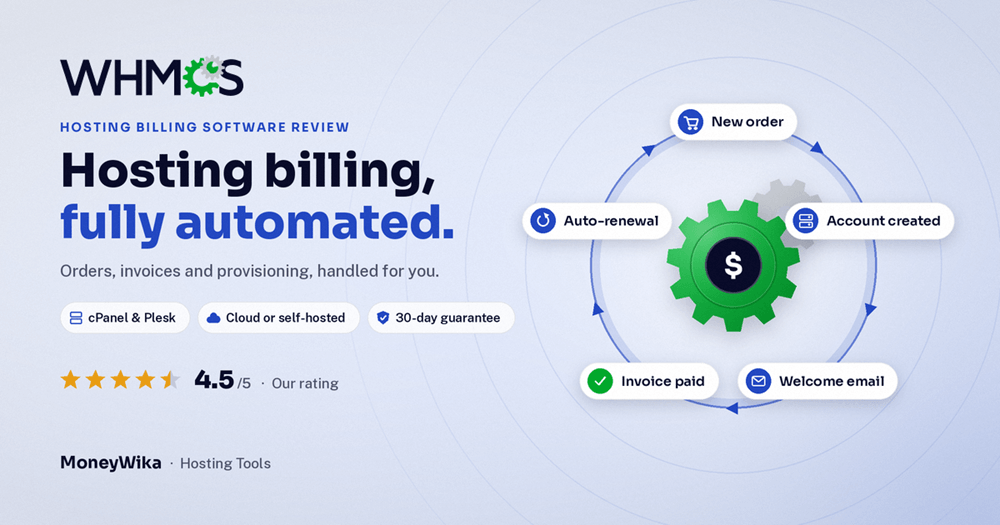
WHMCS is the billing and automation software behind a large share of the world's web hosting companies. It takes an order, charges the customer, creates their hosting account, sends the welcome email, chases unpaid invoices and suspends the service if they never pay. Most of that happens without anyone touching it. It's also the tool hosting businesses complain about most on price, after three increases in three years. This review covers what WHMCS does well, the real 2026 pricing (including the cheaper Cloud plans most people don't know about), how its client limits work, and when it's worth paying for.
Running a small hosting business by hand works for about twenty customers. Then someone's card fails and nobody notices for two months, a new order sits unprovisioned over a weekend, and a renewal email goes out with last year's price. The work isn't hard. There's just a lot of it, and it never stops.
WHMCS exists to take that work off your plate. It has been the default billing platform for hosting companies for well over a decade, and it's now owned by WebPros, the same group behind cPanel and Plesk. That ownership is why it connects so smoothly to the control panels most hosts already run.
It isn't only for big hosts. Agencies use it to bill retainers and maintenance plans, resellers use it to sell hosting under their own brand, and domain sellers use it to automate registrations and renewals.
What WHMCS is
WHMCS (Web Host Manager Complete Solution) is client management, billing and automation software for web hosting and online service businesses. It combines a storefront, a billing system, a client portal and a support desk in one place, and connects to the servers and registrars that actually deliver your services.
Think of it as the business layer that sits on top of your infrastructure. Your servers run the websites. Your registrar holds the domains. WHMCS handles everything between you and your customer: what they bought, what they owe, whether they've paid, and what should happen next.
Your servers run the websites. WHMCS runs the business around them.
How the automation works, from order to renewal
This is the lifecycle WHMCS automates for a typical hosting customer:
The customer orders
They pick a plan and domain on your WHMCS storefront and pay by card, PayPal or another connected gateway.
The account is created automatically
WHMCS tells your server, for example through cPanel or Plesk, to create the hosting account, and asks your registrar to register the domain.
The welcome email goes out
Login details and next steps are sent from a template, without anyone writing them by hand.
Invoices generate and reminders follow
Renewal invoices are created on schedule, cards on file are charged, and overdue reminders are sent at the intervals you set.
Unpaid services are suspended, then terminated
If a customer doesn't pay, WHMCS suspends the service after your chosen grace period and can terminate it later. Paying restores it automatically.
Each step can run without you. That's the whole value: a small team can serve hundreds or thousands of customers because the routine work is handled by the system.
Key features
Billing and invoicing
Recurring invoices, prorated upgrades, credit balances, late fees, taxes and many payment gateways including Stripe and PayPal.
Automated provisioning
Modules for cPanel/WHM, Plesk, DirectAdmin and more create, suspend and remove accounts automatically.
Domain management
Registrar modules handle registrations, transfers and renewals, with domain pricing you control.
Support desk
Built-in ticketing with departments, canned replies and email piping, so support sits alongside billing history.
Client area
A self-service portal where customers pay invoices, upgrade plans, manage domains and open tickets.
Marketplace and API
Hundreds of add-ons and themes, plus an API and hooks for custom integrations.
WHMCS needs something to sell. Many new hosts start on cloud servers like those in our Vultr review, add DDoS-protected hosting such as the options in our KoDDoS review, and speed up customer sites with a CDN like the one in our Bunny.net review.
WHMCS pricing in 2026
Self-hosted WHMCS is licensed monthly and priced by how many active clients you have. These are the official 2026 prices, valid from 1 January 2026.
- Full WHMCS feature set
- Install on your own server
- Email support
- Full WHMCS feature set
- Double the client limit of Plus
- About 11 cents per client at capacity
- Live chat and technical support
- Access to priority support
- 11 tiers by client count
| Business tier | Active clients | Monthly price |
|---|---|---|
| Business 1,000 | Up to 1,000 | $84.95 |
| Business 2,500 | Up to 2,500 | $179.95 |
| Business 5,000 | Up to 5,000 | $284.95 |
| Business 10,000 | Up to 10,000 | $399.95 |
| Business 20,000 | Up to 20,000 | $749.95 |
| Business 30,000 | Up to 30,000 | $999.95 |
| Business 50,000 | Up to 50,000 | $1,249.95 |
| Business 100,000 | Up to 100,000 | $1,499.95 |
| Business Unlimited | Unlimited | $1,999.95 |
Every licence comes with a 30-day money-back guarantee, which works as a risk-free trial. Remember that self-hosted WHMCS also needs a server to run on, so budget roughly $10 a month for that on top of the licence.
Many articles still quote $18.95, $24.95 or $29.95 as the starting price. Those were real prices in earlier years. The official 2026 licensing guide lists Plus at $34.95 a month. Always check the current figure on whmcs.com before budgeting.
The price increases, in numbers
WHMCS's pricing is the main reason some hosts look at alternatives. Here's how the three main tiers have changed:
| Tier | 2024 | 2025 | 2026 |
|---|---|---|---|
| Plus (250 clients) | $24.95 | $29.95 | $34.95 |
| Professional (500) | $39.95 | $44.95 | $54.95 |
| Business (1,000) | $59.95 | $69.95 | $84.95 |
That's a 40% rise on Plus in two years. For a host with 400 clients, the licence went from about $40 to about $55 a month. It's still a small share of revenue for most businesses, but it's a trend worth planning for: assume the price will rise again and build it into your own pricing.
Your tier depends on how many active clients you have, so old accounts that are still marked active can push you into a more expensive tier. Review client statuses regularly and close accounts that no longer use any service. Several hosts report saving a full tier this way.
WHMCS Cloud vs self-hosted
Many people don't realise WHMCS now has a hosted version. With WHMCS Cloud, WebPros runs the software for you, so there's no server to manage or update. It starts much lower, which makes it the easiest way for a new business to begin.
| Plan | Price | Active clients |
|---|---|---|
| Cloud Starter | $9.99/mo | Up to 25 ($0.40 per extra client) |
| Cloud Growth | $25/mo | Up to 100 ($0.25 per extra client) |
| Cloud Expansion | $75/mo | Up to 300 |
Choose Cloud if you're starting out, don't want to manage a server, or have fewer than about 100 clients. Choose self-hosted if you want full control over the server, heavy customisation or modules that need direct access to your installation.
Another route is a reseller hosting plan that includes a WHMCS licence. If you're starting a hosting brand without your own servers, that can be the cheapest combination, though you depend on the reseller for both.
How to set up WHMCS well
Use the 30 days properly
Set up a real product, connect a test server and run a full order from checkout to account creation before you take payments.
Secure it before launch
Move the admin folder, turn on two-factor authentication, restrict admin access by IP and keep WHMCS updated. Billing systems are an attractive target.
Set your billing rules carefully
Decide your invoice timing, reminder schedule, grace period and suspension rules. These settings shape your cash flow more than anything else.
Make your emails trustworthy
Send WHMCS emails through an authenticated domain with SPF, DKIM and DMARC so invoices don't land in spam. Use a proper mailbox for support replies, like the ones in our Fastmail review.
Add only the add-ons you need
Themes and modules are tempting, but each one can add cost and update work. Start lean and add features when customers ask for them.
WHMCS handles billing emails, but not marketing. For onboarding sequences and win-back campaigns, a tool like the one in our Brevo review works well. Selling premium domains too? Our Sedo review covers the domain aftermarket. And to keep track of renewal dates, server updates and licence reviews, we use RytePad as a planner with reminders.
Pros and cons
👍 What we like
- Automates the full customer lifecycle, from order to suspension
- Close integration with cPanel and Plesk, both owned by WebPros
- Large module and add-on marketplace
- Billing, domains, support and client portal in one system
- Cloud plans from $9.99 make starting affordable
- Industry standard, so help and developers are easy to find
- 30-day money-back guarantee on licences
👎 What to watch
- Prices have risen every year since 2024
- No lifetime licences, only monthly subscriptions
- Old active accounts can push you into a higher tier
- Self-hosted version needs a server and regular maintenance
- Interface feels dated compared with newer tools
- Live chat and priority support only on Business tiers
- Add-ons and themes can increase the total cost
WHMCS is a great fit if…
- You run or are starting a web hosting company
- You resell hosting, servers or domains
- You use cPanel, Plesk or DirectAdmin
- You want billing and provisioning fully automated
- You're an agency billing recurring maintenance plans
Look elsewhere if…
- You only send occasional one-off invoices
- You sell physical products or general SaaS
- You have very few clients and tight margins
- You need modern design out of the box without themes
Automate your hosting business
Let WHMCS handle orders, invoices, account setup, reminders and suspensions while you focus on customers. Start on Cloud from $9.99 a month or self-host from $34.95, with a 30-day money-back guarantee.
Cloud from $9.99/month · self-hosted from $34.95/month · 30-day money-back guarantee
Frequently asked questions
Self-hosted WHMCS costs $34.95 a month for Plus (up to 250 active clients), $54.95 for Professional (up to 500) and from $84.95 for Business (1,000 clients), rising to $1,999.95 for unlimited clients.
WHMCS Cloud starts lower, at $9.99 a month for up to 25 active clients. All licences include a 30-day money-back guarantee.
No. WHMCS is now licensed monthly only, using tiers based on active clients. Older owned or lifetime licences are no longer sold.
Your licence tier is based on the number of clients with an active status. Accounts that are still marked active count, even if they rarely buy anything.
Reviewing and closing accounts that no longer use any service can keep you in a lower, cheaper tier. Check WHMCS's licensing guide for the exact definition.
There's no free plan, but every licence comes with a 30-day money-back guarantee, which works like a risk-free trial. Use it to test a full order from checkout to account creation.
WHMCS Cloud is hosted and maintained by WebPros, starting at $9.99 a month for 25 clients. It's simpler and cheaper for new or small businesses.
Self-hosted WHMCS runs on your own server, starting at $34.95 a month for 250 clients. It gives you more control and customisation, but you handle the server, updates and security.
Yes. WHMCS has built-in provisioning modules for cPanel/WHM and Plesk, both also owned by WebPros, plus modules for DirectAdmin and many other control panels, registrars and payment gateways.
The verdict
WHMCS does something very few tools do as well: it runs the whole business side of a hosting company automatically. Orders, account creation, domains, invoices, reminders, suspensions and support all connect, and its integration with cPanel and Plesk is hard to match.
The pricing deserves honesty. Three increases in three years and the end of lifetime licences have frustrated many hosts. But for most businesses the licence is still a small share of revenue, and the time it saves is worth far more. The Cloud plans from $9.99 also make it easier than ever for new businesses to start.
If you sell hosting, servers or domains, WHMCS is still the safest choice. Start on Cloud or Plus, keep your active client list clean, and build future price rises into your own pricing.
Self-hosted pricing comes from the official WHMCS 2026 Customer Licensing Guide, valid from 1 January 2026. Earlier prices are from published WHMCS price history. WHMCS Cloud pricing is from recent third-party listings and may change, so confirm all current prices on whmcs.com before buying. This page contains affiliate links, which means we may earn a commission at no extra cost to you if you sign up through them. Our opinions are our own.