

MoneyWika earns a commission if you buy through some links on this page, at no extra cost to you. How we make money
If your Instagram or TikTok bio only lets you drop one link, that single link has to do a lot of heavy lifting. Beacons.ai wants to be that link, and then some. It bundles a link-in-bio page, a digital storefront, an auto-updating media kit, email marketing, and a growing stack of AI tools into one free-to-start platform built specifically for creators.
I spent time inside the product, dug through its pricing, and lined it up against the two names it gets compared to most, Linktree and Stan Store. This Beacons.ai review covers what it does well, where the cracks show, exactly what you pay, and the type of creator who gets the most out of it.
What Is Beacons.ai?
Beacons.ai is an all-in-one creator platform that started life as a humble link-in-bio tool and grew into something much closer to a business hub. It was founded by Jesse Zhang and Neal Jean, two engineers with machine-learning backgrounds, on a simple thesis: a creator's bio link should be the front door to a real business, not just a list of blue links.
That thesis has aged well. Today Beacons is used by more than 3 million creators, has raised roughly $165 million in funding across its Seed through Series C rounds, and packs in over a dozen integrated tools. The whole system is now wrapped around Beam, an AI teammate that helps you design your page from a text prompt, write product descriptions and emails, generate brand-outreach pitches, and answer plain-language questions about your own analytics.
Beacons is best understood not as a "Linktree alternative" but as a bundle: it tries to replace the five or six separate subscriptions a creator would otherwise stitch together to run their business, all behind a single link and one login.
Who Is Beacons For?
Beacons casts a wide net, but it is not the right fit for everyone. From our own use of it, here are the creators who get genuine value from it, and the ones who might feel it is overkill.

Selling ebooks, presets, templates, or mini-courses? The built-in store, checkout, discount codes, and sales emails mean you never send buyers off-platform.

The auto-updating media kit and AI brand-outreach tools are built for creators who live off sponsorships and want to pitch faster with current stats.

Appointment booking, invoicing, and payment plans via Klarna and Affirm let service providers take bookings and get paid without a separate scheduler.

If you just want a tidy list of links and never plan to sell anything, Beacons is more platform than you need. A simpler tool will feel lighter.
Persona photos are illustrative stock images from Unsplash.
In short, Beacons rewards creators who think of themselves as a small media business. The more of its tools you actually use, the more the all-in-one pitch pays off. Use it purely as a link list and you are leaving most of its value on the table.
Why Use Beacons: The Tools That Matter
Beacons' pitch rests on consolidation. Instead of paying for a link-in-bio tool, a storefront, an email platform, a media-kit builder, and a scheduler separately, you get them woven together. Here are the pieces that actually earn their keep.
Link in Bio & Website
Unlimited links, deep customization of fonts, colors and layouts, plus a one-click AI page builder. Beam can design your whole page from a single prompt.
Digital Storefront
Sell products, memberships, and services with discount codes, order bumps, inventory limits, and payment plans through Affirm and Klarna on orders over $50.
Auto-Updating Media Kit
Connect your socials and Beacons keeps a polished media kit current for brand pitches, syncing your latest follower and engagement stats automatically.
Email Marketing
Build a list and send campaigns and automated sequences natively. The free plan caps sends, but it is enough to start nurturing an audience day one.
Beam, Your AI Teammate
Generates product descriptions, marketing emails, and brand-outreach pitches, and answers plain-language questions about your traffic and growth.
Analytics & Affiliate Marketplace
See what your audience clicks, where traffic comes from, and how it converts, plus an affiliate marketplace to earn commissions promoting other brands.
"Beacons is less a link-in-bio tool and more a bet that creators would rather run their whole business from one dashboard than juggle six."
A quick, honest caveat on the email tool. Beacons' built-in email marketing is genuinely handy for getting started, but it is not a replacement for a dedicated platform once your list and automations get serious. If email is the core of how you monetize, it is worth pairing Beacons with, or comparing it to, a purpose-built tool. Our ActiveCampaign review digs into what a heavy-duty automation platform adds, and if you are weighing the big email names our ActiveCampaign vs Mailchimp comparison breaks that decision down feature by feature.
You can build and publish a Beacons page in under five minutes. Map out your links, lead magnet, and one or two products before you start, so Beam has clear material to design around instead of a blank slate.
How Beacons Compares to Competitors
The link-in-bio space is crowded, but for most creators the real choice comes down to three names: Beacons, Linktree, and Stan Store. They are built on different philosophies.
Linktree is the pioneer and the simplest, a clean, fast list of links with light commerce bolted on. Stan Store is the opposite end: a polished, conversion-focused digital storefront with one-tap checkout, but no free plan and a higher entry price. Beacons sits in the middle as the feature-packed all-rounder with the most generous free tier.
| Feature | Beacons | Linktree | Stan Store |
|---|---|---|---|
| Free plan | Yes, robust | Yes, basic | No (trial only) |
| Starting paid price | ~$10/mo | ~$5/mo | ~$29/mo |
| Transaction fees | 0–9% | 0% (paid tiers) | 0% (+ Stripe) |
| Built-in store | Full | Limited | Core focus |
| AI tools | Extensive (Beam) | Minimal | Basic |
| Email marketing | Built-in + automations | Collection only | Built-in |
| Auto media kit | Yes | No | No |
| Best for | All-in-one hub | Simple link list | Selling products |
The pattern is clear. If you want the simplest possible link page and brand familiarity, Linktree wins on ease. If you are a pure digital-product seller who values the highest checkout conversion and hates transaction fees, Stan Store makes a strong case despite the price. But if you want the widest set of tools for the lowest starting cost, and you will genuinely use them, Beacons offers the most for free. It also tends to ship new features six to twelve months ahead of Linktree.
Beacons Pricing and the 9% Fee You Need to Understand
Beacons pricing is genuinely flexible, and genuinely confusing, because the company restructures it often. Here are the four plans on its pricing page, checked on 22 November 2026.
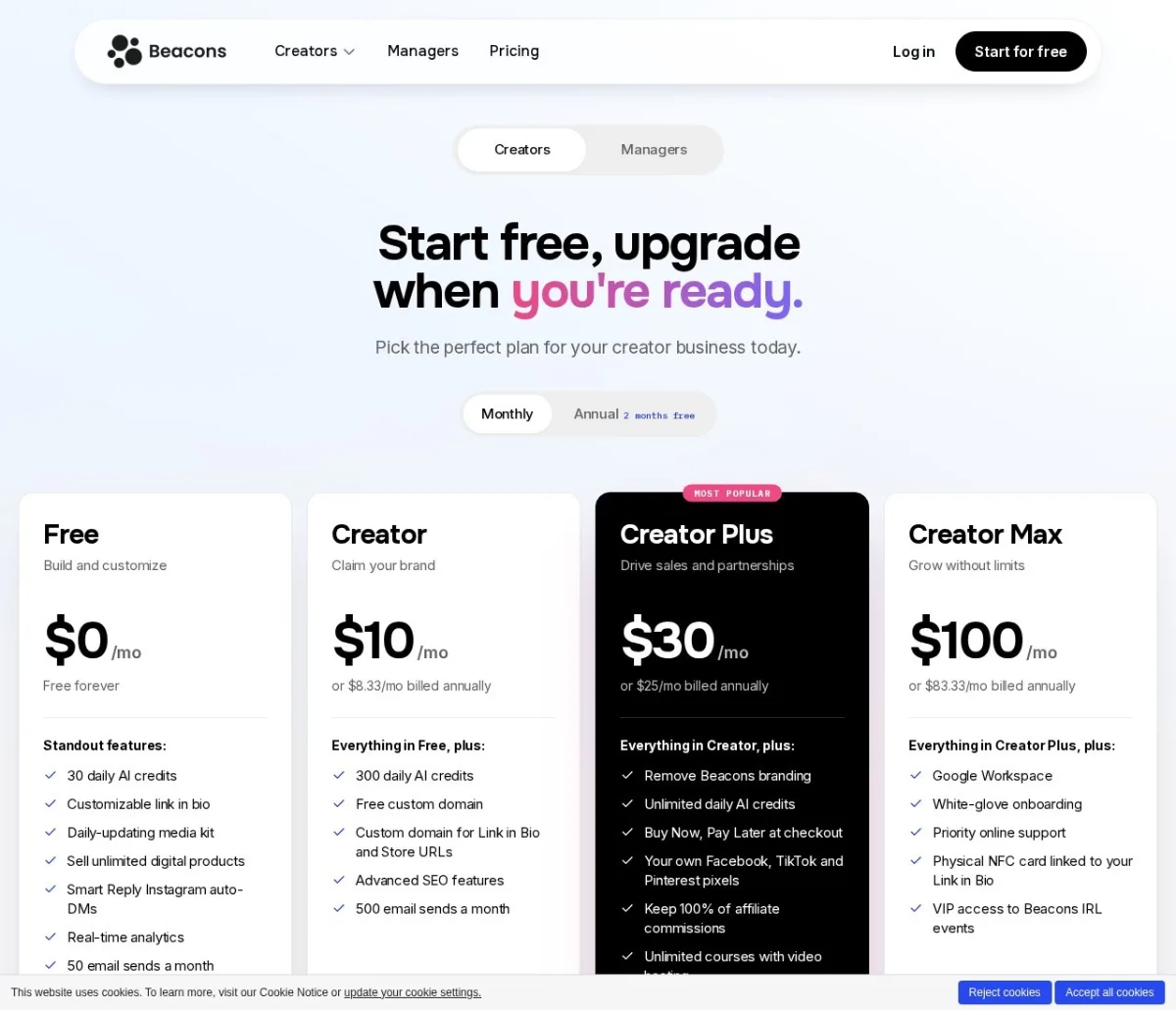
- All core creator tools
- Unlimited links & store
- Media kit + 50 email sends a month
- Beam AI assistant
- 9% seller fee, Beacons branding
- Everything in Free
- Custom domain
- Advanced SEO features
- 500 email sends a month
- Still a 9% seller fee
- Everything in Creator
- 0% seller fees on sales
- Removes Beacons branding
- Buy Now, Pay Later at checkout
- Unlimited email sends
- Everything in Creator Plus
- NFC card linked to your Link in Bio
- VIP access to Beacons events
- 0% seller fees on sales
Paying yearly works out to about two months free on each paid plan.
On the Free and Creator plans, Beacons takes a 9% cut of your sales, and that is on top of standard Stripe processing fees. Sell a $50 course and Beacons keeps roughly $4.50 before Stripe's cut. It is the single most important number in Beacons pricing, so budget for it.
Here is the practical break-even. Because Creator Plus removes that 9% fee, it pays for itself once you sell more than about $333 a month in digital products ($333 × 9% ≈ $30, its monthly price). The $10 Creator plan keeps the 9% fee, so pick it for the custom domain and bigger email allowance, not to save on fees. Below that, the Free plan's fee is cheaper than a subscription. Above it, upgrading is a no-brainer. One more thing to remember: Beacons has no built-in video calls or advanced scheduling, so factor in any add-on tools your workflow needs.
Beacons updates its plans and fees regularly, and exact tier names shift over time. Treat the numbers above as a 2026 snapshot and confirm current pricing on the Beacons site before you commit.
Beacons Pros and Cons
👍 What We Liked
- Remarkably generous free plan with real monetization built in
- Genuine all-in-one: store, email, media kit, analytics in one place
- Beam AI actually saves admin time on copy and outreach
- Fast, guided setup, live in under five minutes
- Ships new features well ahead of most rivals
- Flexible per-app upgrades so you pay for what you use
👎 Worth Considering
- 9% seller fee on the Free and Creator plans adds up fast
- Pricing structure is complex and changes often
- Customer support draws mixed reviews on Trustpilot
- Occasional bugs and mobile sync hiccups reported
- More setup and learning curve than a simple link tool
- No native video calls or advanced scheduling
Ready to turn your bio link into a business?
Beacons is free to start, with no credit card and no upfront cost. Build your page, add your products, and share your link in minutes.
Frequently Asked Questions
Final Verdict: Is Beacons.ai Worth It?
Our take
Beacons.ai is one of the most complete creator platforms you can start using for free, and that free tier is the headline. Where most rivals lock monetization behind a paywall, Beacons hands you a store, email, a media kit, analytics, and a capable AI teammate on day one. For creators who see themselves as a small media business, especially digital-product sellers and brand-deal creators, the consolidation is a real time and money saver.
It is not flawless. The 9% fee on the free plan is steep, the pricing takes effort to decode, and support gets mixed reviews. But if you weigh those trade-offs against everything you get without paying a cent, Beacons remains the platform I would point most growing creators toward first in 2026. Start on the free plan, prove the model works for you, then move to Creator Plus the moment your sales cross the break-even line.
More in Courses, Creators & E-commerce
Sources
- Beacons. Pricing page and home page. Checked 22 Nov 2026.