

MoneyWika earns a commission if you buy through some links on this page, at no extra cost to you. How we make money
Aircall is a cloud phone system built for the teams that live on the phone all day: sales reps working a list, and support agents fielding whatever comes in. No desk phones, no PBX hardware, just a number your whole team can work from anywhere. New numbers can be live in minutes. Its real selling point is not the calling. It is what happens around the call: the CRM logs it automatically, the recording and transcript attach themselves, and the manager sees the numbers without asking anyone. Here is how it works, what it costs in 2026, and where it stops making sense.
Ask a sales manager where their pipeline data goes wrong and you will usually get the same answer. The calls happen. The notes do not. Picture a rep who dials forty numbers, has six real conversations and logs two of them: by Friday the CRM is a partial record of a week nobody can reconstruct.
Aircall was built around that gap. It is a cloud-based phone and contact centre platform, which is a dry way of saying it puts your business number in an app on every laptop and phone, then wires that number directly into the software your team already works in. The call gets made, and the record of it writes itself.
Below we walk through what Aircall actually does, the features that earn their keep, who it suits, what it costs in 2026 including the add-ons that surprise people, and the honest reasons you might pick something else.
A 30 seconds look at how Aircall works in practice. Watch on Aircall ↗
What Is Aircall?
Aircall is a VoIP phone system that runs entirely in software. There is no hardware to buy and nothing to install in a server cupboard. You pick a number, invite your team, and everyone makes and takes calls through a desktop or mobile app over the internet.
That much is true of most modern cloud phone providers, including budget-friendly options we have covered like CallHippo and Calilio. What separates Aircall is where it sits in your stack. It is designed less as a standalone phone line and more as a calling layer bolted onto the tools your team already uses.
In practice that means the rep never leaves the CRM. A contact record has a click-to-call button. Dialling it opens Aircall, the conversation happens, and when it ends the call, its duration, the recording link and any tags land back on that record automatically. Nobody types a note. Nothing goes missing.
The phone system is easy. Getting an accurate record of what was said, by whom, to which customer, without asking anyone to write it down, is the hard part.
Aircall serves both sides of the phone. Sales teams get outbound tooling like power dialling and outbound call campaigns. Support teams get inbound routing, IVR menus, business hours, shared inboxes and queue management. A lot of companies buy it for one and end up using both.
Key Features Worth Knowing About
250+ native integrations
Salesforce, HubSpot, Zendesk, Pipedrive, Intercom, Slack and Zoho connect natively (Salesforce needs Professional), plus an open API and webhooks for anything custom.
International numbers
Aircall advertises numbers in 100+ countries, though its published coverage list names about 40. New local, national or toll-free numbers can go live in minutes; some countries ask for documents or a local address first.
Power dialler & click-to-call
Work through a list without manual dialling, and launch calls straight from a CRM record or web page in one click. The Power Dialer is on Professional and up.
Smart routing & IVR
Build menus, ring groups, business hours and time-based routing (smart routing comes with Professional) so calls reach the right person instead of the whole office.
Coaching tools
Call whispering (Professional and up) lets a manager coach a rep mid-call without the customer hearing, and recordings make review sessions concrete.
Analytics & AI voice tools
Track volume, answer rates, missed calls and rep activity. Call transcripts and 50 AI Voice Agent minutes a month come with every plan, AI call summaries come with Professional, and real-time AI coaching costs extra.
If your team does not run on a CRM, most of Aircall's advantage evaporates and a cheaper VoIP line will do the same job. If your team does, this is where the value lives. It pairs particularly well with a sales-first CRM like the one in our Close CRM review, and you can push call events into wider workflows using the automation approach we cover in our Make.com review.
Who Actually Uses Aircall, and For What
Four patterns come up again and again. If you recognise your team in one of them, Aircall is probably on your shortlist for good reason.
Outbound sales teams
Reps work a list with the power dialler while every attempt, connect and outcome writes itself into the CRM. Managers get activity data that reflects what actually happened rather than what someone remembered to log.
Customer support desks
Inbound calls route through an IVR to the right queue, land next to the customer's ticket history in a helpdesk like Zendesk, and get recorded for quality review. Shared inboxes stop calls falling to one person.
Distributed and remote teams
Everyone works from the same business number on their own laptop, in whatever country they happen to be. Local numbers make the company look present in markets where it has no office.
Agencies and client-facing services
Separate numbers per client or campaign, routed to the right pod, with recordings and reporting that make billable phone work easy to evidence.
Aircall Pricing in 2026
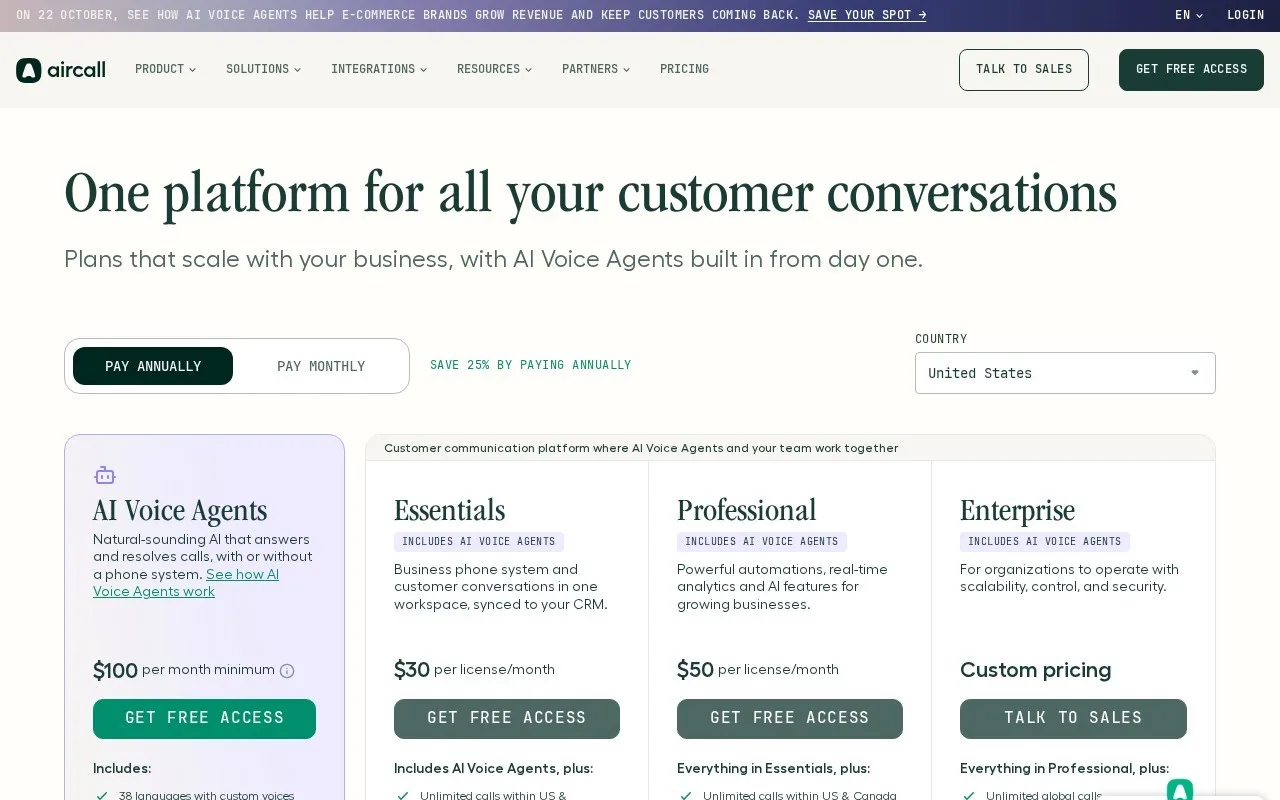
Aircall publishes two plans and quotes a third (Enterprise, for 25 licences or more), and it also sells AI Voice Agents on their own from $100 a month. The important detail most comparison posts bury is that Essentials and Professional are priced per licence with a three-licence minimum, so nobody actually pays $30 a month. The realistic entry point is $90 a month on annual billing, or $120 month to month (prices checked October 26, 2026).
The add-ons that change your bill
This is where budgets slip. Several things people assume are included are billed separately, and on a mid-sized team they add up quickly.
A five-person sales team on Professional is $250 a month on annual billing (about $350 month to month) before anything else. Add Analytics+ and a couple of extra numbers and you are closer to $340. Every user needs a licence, you pay for the contracted minimum even if seats sit empty, annual billing saves 25%, and US invoices can add taxes and regulatory fees. Pricing and plan contents change, so confirm current rates on the official Aircall site before you commit.
Pros & Cons
👍 What we liked
- Large integration library, 250+ native apps
- Quick to set up: new numbers go live in minutes, no hardware
- Call transcripts and 50 AI Voice Agent minutes a month on every plan
- Clean, uncluttered interface
- Strong coaching tools: whispering, recordings, live monitoring
- Serves both outbound sales and inbound support well
- 99.95% uptime claim and a public status page
👎 What to watch
- Three-licence minimum makes the true entry price $90/month
- Pricier than budget VoIP rivals on a per-seat basis
- Real-time AI coaching, Analytics+ and extra numbers cost extra
- You pay for contracted licences even if some sit unused
- Prioritized support only on Enterprise
- Overkill if your team does not run on a CRM
Should You Choose Aircall?
Choose Aircall if…
- Your team lives in a CRM or helpdesk you want calls logged into
- You run outbound sales and need dialling plus coaching
- You have at least three people who need a licence
- You want local numbers across several countries
- You value fast setup and adoption over rock-bottom price
Look elsewhere if…
- You are a solo operator or a two-person team
- Price per seat is your main decision criterion
- You just need a second business number, nothing more
- You want real-time AI coaching without a $49-a-seat add-on
- You need heavy contact-centre features at the entry tier
If you land in the second column, it is worth comparing against lower-cost options first. Our CallHippo review covers a cheaper per-seat alternative aimed at small teams (other phone systems teams often compare include Dialpad, RingCentral, JustCall and CloudTalk), and if the goal is simply reaching more of the right people rather than dialling faster, an email-led approach like the one in our ActiveCampaign review may get you further for less.
Put your phone system where the work happens
Aircall connects your business number to the CRM and helpdesk your team already uses, so every call logs itself. New numbers in minutes, no hardware, and a 7-day free trial to test it with your own CRM.
Frequently Asked Questions
Published pricing starts at $30 per licence per month for Essentials and $50 for Professional, both billed annually. Paying monthly raises those to $40 and $70. An Enterprise tier is quoted for 25 licences or more.
The number that catches people out is the three-licence minimum on Essentials and Professional, which makes the smallest realistic spend about $90 per month on annual billing rather than $30. Add-ons for real-time AI coaching, analytics and extra numbers sit on top of that, while call transcripts are included.
Yes. Aircall was founded in Paris in 2014, says more than 24,000 businesses use it, and has raised $226 million in venture funding. It publishes a trust page and a public status page, and it holds 4.2 out of 5 on Capterra from 466 reviews (October 2026).
Yes. Both are native integrations, and they are among the main reasons teams choose Aircall in the first place. Calls, recordings and outcomes sync back to the contact or deal record without manual logging.
The wider library covers 250+ apps including Zendesk, Pipedrive, Intercom, Zoho and Slack, plus a public API and webhooks if you need to wire it into something custom. Note that the Salesforce integration sits on the Professional plan rather than Essentials.
Better is the wrong frame. They are aimed at different buyers. Budget providers win clearly on price per seat and suit small teams that mainly need reliable calling and a shared number.
Aircall wins on depth of integration, coaching tools and polish, which matter most when calls feed a CRM-driven sales or support process. If your workflow does not depend on that, you are paying for capability you will not use.
Aircall offers a 7-day free trial with up to 3 numbers and 100 call minutes (calls are capped at 7 minutes, and porting isn't available during the trial), so you can test calling, routing and the integrations that matter to you before paying. There is no permanently free plan.
Use the trial deliberately: connect your actual CRM, run real calls through it, and check that the data lands where you expect. That is the part worth validating, and it is much harder to judge from a demo.
VoIP is light on bandwidth but sensitive to stability. Aircall recommends at least 2 Mbps, a round-trip time under 200 ms, jitter under 30 ms and no packet loss, and a wired connection beats patchy WiFi every time.
Call-quality complaints about any cloud phone system often trace back to the local network rather than the provider. If you are rolling out to a remote team, it is worth checking connections before blaming the platform.
Yes. Aircall supports number porting, so you can bring an existing business number across rather than asking customers to learn a new one.
Porting timelines depend on your current carrier and country. For US and Canadian numbers, Aircall says it typically takes 10 to 15 business days once all details are validated. Start the process early, and keep the old line active until the port completes so nothing drops in the meantime.
The Verdict
Aircall does one thing especially well: it makes the phone a first-class part of a software workflow. The integration library is one of the largest in its class, and new numbers are quick to set up, which is not a small thing when you are rolling out to a sales floor.
For a support desk that needs proper routing, or an outbound team that needs dialling and coaching, it earns its price comfortably. The coaching tools in particular turn call reviews from vague conversations into specific ones.
The reservations are all commercial rather than technical. The three-licence minimum prices out the smallest teams, you pay for contracted licences whether or not they are used, and the most advanced AI tooling, such as real-time coaching, is a paid add-on, even though call transcripts and some AI agent minutes are now included. Budget for the real total, not the headline.
Get a quote for your actual seat count, run the trial against your real CRM, and if the calls land where you need them, Aircall is one of the most dependable choices on the market.
More in Sales, CRM & Business Phones
- Close CRM Review 2026: Built-In Calling, Pricing and Who It’s For
- GoHighLevel Review 2026: Pricing, SaaS Mode and Who It Suits
- CallHippo Review 2026: Pricing, Power Dialer and Add-On Costs
- Calilio Review 2026: AI VoIP Pricing, Features and Who It Suits
- Chloe by Close Review: The AI That Calls & Books Meetings
Sources
- Aircall. Pricing page and home page. Checked 22 Nov 2026.